Choosing a new printer can feel like navigating a complex maze with countless options and technical jargon. As the lines between home and office blur and our printing needs evolve, the fundamental question persists: should you invest in a laser printer or an inkjet? Both technologies have steadily advanced, offering distinct advantages tailored to different users. In 2026, understanding these core differences is key to finding the printing solution that perfectly aligns with your workflow, budget, and quality expectations. Let’s explore the world of printers to help you make an informed decision and optimize your printing experience.
What is a Laser Printer? (Definition and Operating Principle)
At its heart, a laser printer operates on a fascinating electrophotographic process, vastly different from its inkjet counterpart. Instead of liquid ink, a laser printer uses a fine, powdered substance called toner. The magic begins when a laser beam “draws” an electrostatic image of your document onto a rotating, light-sensitive drum. This drum then attracts the toner particles to the charged areas. The paper, simultaneously charged with an opposite static electricity, picks up the toner from the drum. Finally, the paper passes through a fuser assembly, where heat and pressure permanently bond the toner to the paper, creating a smudge-proof and durable print. This intricate dance allows laser printers to produce exceptionally sharp text and graphics at impressive speeds, particularly for monochrome documents.
Advantages and Disadvantages of Laser Printers
When considering a laser printer, it’s essential to weigh its notable strengths against its potential drawbacks to determine if it’s the right fit for your printing environment.
Advantages
|
Our Picks for the Best Laser Printer in 2026
As an Amazon Associate I earn from qualifying purchases.
|
||
| Num | Product | Action |
|---|---|---|
| 1 | HP Laserjet MFP M234dw Wireless Printer, Print, scan, Copy, Fast speeds, Easy Setup, Mobile Printing, Best-for-Small Teams, Instant Ink Eligible |

|
| 2 | Brother DCP-L2640DW Wireless Compact Monochrome Multi-Function Laser Printer with Copy and Scan, Duplex, Mobile, Black & White | Includes Refresh Subscription Trial(1), Works with Alexa |
|
| 3 | Brother MFC-L2820DW Wireless Compact Monochrome All-in-One Laser Printer with Copy, Scan and Fax, Duplex, Black & White | Includes Refresh Subscription Trial(1), Works with Alexa |
|
| 4 | HP LaserJet MFP M235sdw All-in-One Laser Wireless Printer, Scan/Copy, Black & White, Duplex, Best-for-Office |
|
| 5 | Brother DCP-L2640DW Wireless Compact Monochrome Multi-Function Laser Printer with Copy and Scan, Duplex, Black & White Output | Includes Refresh Subscription Trial(1), (Renewed Premium) |
|
| 6 | Canon imageCLASS MF284dw Wireless Black & White Laser Printer – All-in-One for Home Use, Print/Copy/Scan, 2-Sided Printing, 35 PPM, Auto Doc Feeder, Mobile Device Compatible, Starter Toner Included |
|
| 7 | Brother HLL3280CDW Wireless Compact Color Laser Printer, Duplex, Mobile Printing & Ethernet | Includes 2 Month Refresh Subscription Trial¹, Amazon Dash Replenishment Ready (Renewed Premium) |
|
| 8 | Brother HL-L2405W Wireless Compact Monochrome Laser Printer with Mobile Printing, Black & White Output | Includes Refresh Subscription Trial(1), Works with Alexa |
|
| 9 | Brother HLL6210DW Business Monochrome Laser Printer with Large Paper Capacity, Wireless and Gigabit Ethernet Networking, Advanced Security Features and Mobile Printing (Renewed Premium) |
|
| 10 | Brother HL-L2460DW Wireless Compact Monochrome Laser Printer with Duplex, Mobile Printing, Black & White Output | Includes Refresh Subscription Trial(1), Works with Alexa |
|
Laser printers are workhorses, excelling in environments demanding speed and efficiency. Their primary benefit is often their blazing-fast print speeds, with many models capable of 30 to 100 pages per minute (PPM), significantly reducing wait times for large documents. The quality of text prints from a laser printer is consistently crisp, sharp, and highly defined, making them ideal for professional reports, contracts, and any text-heavy documents where clarity is paramount. For high-volume users, the cost per page is remarkably low because toner cartridges last much longer than ink cartridges, yielding thousands of prints before needing replacement. Furthermore, laser prints are inherently durable and resistant to smudging or fading, a critical factor for archival documents or frequently handled materials. Unlike liquid ink, toner powder does not dry out, ensuring your printer is always ready, even after periods of inactivity.
Disadvantages
Despite their many benefits, laser printers come with certain trade-offs. The initial purchase price for a laser printer is typically higher than an inkjet model, which can be a significant barrier for budget-conscious individuals or small home offices. They also tend to be larger and heavier, requiring more dedicated space and potentially posing a challenge in confined environments. While modern color laser printers are available, their color output may not match the photographic detail and vibrancy of an inkjet, especially for intricate images or professional photo printing. Additionally, although individual toner cartridges offer a low cost per page, replacing a full set of color toner cartridges for a high-end laser printer can still involve a substantial upfront cost.
Advantages and Disadvantages of Inkjet Printers
Inkjet printers have carved out their niche by offering a different set of strengths, particularly appealing to users with diverse printing needs.
Advantages
Inkjet printers often boast a lower initial investment, making them a more accessible option for many households and small businesses. Their forte lies in producing stunning, high-quality color images and photos, thanks to the ability of liquid ink to blend smoothly and capture intricate details. These printers offer greater versatility in media handling, capable of printing on various paper types, including glossy photo paper, card stock, and even some fabrics, often with borderless printing capabilities. Many inkjet models are also compact and lightweight, fitting easily into smaller workspaces. For occasional prints, inkjets require no warm-up time, delivering the first page almost instantly.
Disadvantages
Inkjet printers do have several limitations, particularly concerning speed and ongoing costs. They are generally slower than laser printers, averaging 5-15 PPM for monochrome documents and even less for color, which can be inefficient for large print jobs. While the printer itself is cheaper, the cost per page for ink is usually higher, and cartridges require more frequent replacement, leading to potentially significant long-term expenses. A common issue is ink drying out or printhead clogging if the printer goes unused for extended periods, necessitating cleaning cycles that consume valuable ink. Furthermore, liquid ink prints can be prone to smudging if handled immediately after printing, and older models may exhibit banding in large color blocks.
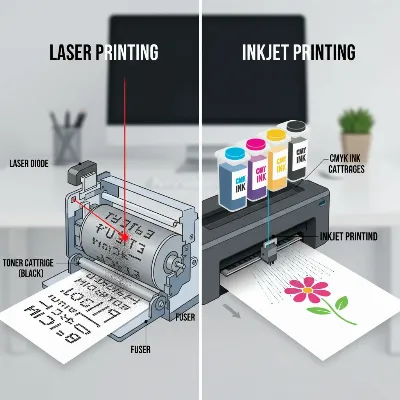 A side-by-side conceptual comparison of laser and inkjet printer technologies, showing a laser beam and toner on one side and liquid ink droplets spraying on paper on the other, in an illustrative, modern infographic style.
Types of Laser Printers Popular on the Market
Laser printers come in various configurations, each designed to meet specific printing demands, from simple text documents to full-color office graphics.
Monochrome Laser Printers
Monochrome, or black-and-white, laser printers are the quintessential choice for environments where the vast majority of printing involves text documents and simple graphics. They excel in speed and efficiency, often being the fastest and most cost-effective per page for black-and-white output. These printers are workhorses for busy offices, legal firms, or anyone who primarily prints reports, invoices, or contracts. Their toner cartridges are typically very high-yield, contributing to low running costs.
Color Laser Printers
For those who need to print documents with color elements, such as presentations, charts, or marketing materials, color laser printers offer a robust solution. They provide vibrant and consistent color reproduction for graphics and text, though generally not the photo-realistic quality an inkjet can achieve. While the initial cost and toner replacement for color models are higher than monochrome versions, they still offer the speed and low per-page cost benefits of laser technology for high-volume color document printing.
Multifunction (All-in-One) Laser Printers
Multifunction laser printers, often referred to as AIOs, integrate printing with other essential office functions: scanning, copying, and often faxing. These devices are incredibly popular in small offices and home office setups where space is at a premium and versatility is crucial. An all-in-one laser printer offers the speed and text quality benefits of laser technology while consolidating multiple machines into one, streamlining workflows and reducing clutter. They can be found in both monochrome and color variants, catering to diverse needs.
Comparison Table of Key Printer Features
To help clarify the differences, here’s a direct comparison of inkjet and laser printers across several critical metrics:
| Feature | Inkjet Printer | Laser Printer |
|---|---|---|
| Technology | Sprays liquid ink droplets onto paper | Uses laser beam to fuse powdered toner onto paper with heat |
| Print Quality (Text) | Good, but can sometimes smudge or show less sharpness | Excellent, crisp, sharp, and smudge-resistant |
| Print Quality (Color) | Excellent for photos, vibrant graphics, smooth blending | Good for business graphics and documents, less photo-realistic |
| Speed | Slower (5-15 PPM for mono, 3-7 PPM for color typically) | Faster (20-100+ PPM for mono, good for color documents) |
| Initial Cost | Generally lower | Generally higher |
| Cost Per Page | Higher (ink cartridges yield fewer pages) | Lower (toner cartridges yield many more pages) |
| Maintenance | More frequent cartridge changes, potential for clogs | Less frequent toner changes, no drying out |
| Printer Size | Often more compact and lighter | Typically larger and heavier |
| Paper Versatility | Excellent for various media (photo paper, fabrics) | Best for standard paper, limited on specialty media |
| Idle Usage | Ink can dry out and clog printheads | Toner does not dry out, always ready to print |
| Noise Level | Generally quieter operation | Can be louder due to fuser and fan |
| Energy Consumption | Lower in idle, higher during printing due to warm-up | Higher in idle due to fuser, but more efficient for high-volume printing |
> “The choice between laser and inkjet often boils down to a fundamental question: are you printing memories or memoranda? Inkjets capture the nuances of a photo, while lasers define the clarity of a contract.” – Robert Covington, Senior Product Manager, Toshiba America Business Solutions
Factors to Consider When Buying a Printer (Buying Guide)
Selecting the right printer involves more than just picking between laser and inkjet. Consider these factors to ensure your new device perfectly suits your needs.
Usage Needs
Before anything else, identify what kind of documents you’ll print most often. If vibrant photos, marketing materials with rich graphics, or artistic projects are your priority, an inkjet printer’s superior color reproduction and media versatility will serve you best. For high volumes of sharp text documents, reports, or legal papers, a laser printer is the undisputed champion. Consider your print frequency and volume—occasional, low-volume printing might favor an inkjet, while daily, high-volume tasks are better suited for a fast laser printer. Lastly, think about whether you need additional functions like scanning, copying, or faxing. Multifunction (all-in-one) models are available in both categories and can be a significant space and cost saver.
Budget
Your budget should encompass more than just the printer’s initial sticker price. While inkjet printers typically have a lower upfront cost, laser printers often prove more cost-effective in the long run due to their significantly lower cost per page for toner. When comparing, factor in the price of replacement ink or toner cartridges and their page yield. Also, consider the potential maintenance costs (like printhead cleaning for inkjets or drum unit replacement for lasers) and energy consumption. Calculating the total cost of ownership (TCO) over a few years will give you a more accurate financial picture.
Features
Modern printers offer a plethora of features that can enhance your printing experience. Print speed, measured in pages per minute (PPM), is critical for high-volume users. Print resolution, expressed in dots per inch (DPI), indicates the sharpness and detail of prints, with higher DPI generally meaning better quality, especially for images. Connectivity options are vital; look for Wi-Fi for wireless printing from multiple devices, Ethernet for stable network connections in offices, and USB for direct connections. Features like automatic duplex printing (two-sided printing) can save paper and time. Finally, assess paper tray capacity and the types of paper the printer can handle to ensure it meets your specific requirements.
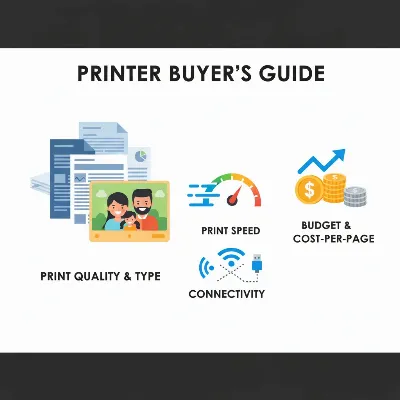 An illustrative image showing various factors to consider when buying a printer, such as a stack of documents for volume, a vibrant photo for quality, a dollar sign for budget, and Wi-Fi symbols for connectivity, all integrated into a cohesive, modern graphic.
Brand and Reliability
Choosing a reputable brand can significantly impact your printer’s reliability and the availability of support. Established brands like Brother, Canon, HP, and Epson consistently receive high ratings for their printers. Research user reviews and expert ratings for specific models you are considering. Pay attention to the warranty policy and the availability of customer support and service centers. A reliable printer from a trusted brand, even if slightly more expensive upfront, can save you from frustration and costly repairs down the line.
Top Recommended Printers for 2026
Keeping pace with the latest advancements, here are some highly-regarded printer models for 2026 that cater to different user needs and preferences.
For monochrome laser printing, the Canon imageClass MF462dw and Brother HL-L2460DW XL are consistently praised for their fast speeds, crisp text output, and robust performance, making them excellent choices for busy home offices and small businesses focusing on text documents. If you need a color laser printer, the Brother MFC-L3780CDW stands out for its balanced output quality and competitive toner costs, while the HP Color LaserJet Enterprise MFP M480f is a top contender for larger workgroups requiring reliable color document printing.
In the inkjet realm, for versatile home and small office use, the Epson EcoTank Pro ET-5850 offers exceptional document sharpness, fast printing, and incredibly low running costs thanks to its refillable ink tanks. The HP OfficeJet Pro 9125e is a strong all-in-one contender, known for its reliable performance and intuitive app integration. For dedicated photo enthusiasts, the Canon imagePROGRAF PRO-310 (though higher end) or Epson EcoTank Photo ET-8550 are often cited for their superior photo printing capabilities, offering wide color gamuts and vibrant results.
These recommendations highlight models that consistently deliver on their promises, balancing performance, cost-efficiency, and features to meet the diverse demands of today’s users.
Conclusion
The debate between laser and inkjet printers in 2026 isn’t about one being inherently “better” than the other; it’s about finding the ideal match for your specific printing needs. If your tasks primarily involve high-volume text documents, speed, and low long-term costs, a laser printer is likely your best bet, offering unparalleled efficiency and crisp output. However, if vibrant photo quality, versatile media handling, and a lower initial investment are more crucial for your creative projects or occasional color printing, then an inkjet printer will serve you admirably. By carefully considering your usage, budget, desired features, and the importance of long-term costs, you can confidently navigate the market. Which printer type will become the cornerstone of your home or office productivity in the coming year?
Câu Hỏi Thường Gặp
Are laser printers suitable for printing photos?
While color laser printers can produce decent color graphics for documents and presentations, they generally do not match the photo-realistic quality, detail, and color vibrancy of inkjet printers, especially for professional-grade photography or art prints. Inkjets are specifically designed for superior photo reproduction.
Do inkjet printers dry out if not used?
Yes, liquid ink in inkjet cartridges can dry out or clog the printheads if the printer remains unused for extended periods. This can lead to print quality issues like streaks or missing colors and may require cleaning cycles that consume ink. Laser printers, using powdered toner, do not suffer from this problem.
What is the average lifespan of a laser printer compared to an inkjet?
Laser printers are generally built for higher duty cycles and often have a longer lifespan, especially in high-volume environments. Many can last five years or more with proper maintenance. Inkjet printers, while durable, may have a slightly shorter average lifespan, particularly with heavy use or frequent printhead issues.
Is it always cheaper to own a laser printer in the long run?
For users with high-volume printing needs, particularly for black-and-white documents, a laser printer typically offers a lower cost per page for toner, making it more economical in the long run despite a higher initial purchase price. For low-volume or primarily photo printing, an inkjet might have a lower overall cost.
Can I connect both types of printers wirelessly?
Yes, the vast majority of modern laser and inkjet printers offer various connectivity options, including Wi-Fi for wireless printing from computers, smartphones, and tablets. Many also support Ethernet for wired network connections and USB for direct device connections, providing flexibility for diverse setups.
