For a small business in 2026, the best color laser printers balance speed, print quality, and cost-effectiveness. Top models like the HP Color LaserJet Pro MFP 4301fdw offer multifunctionality and security, while the Brother MFC-L8905CDW is ideal for high-volume needs. Budget-conscious options include the HP Color LaserJet Pro 3201dw and Brother HL-L3295CDW, ensuring professional document production and long-term savings.
What is a Laser Printer? (Definition and How it Works)
At its core, a laser printer is an electrostatic digital printing process that delivers crisp, high-quality text and graphics. Unlike inkjet printers which spray liquid ink onto paper, laser printers employ a sophisticated dry printing technology. The process begins with a laser beam drawing an image of your document onto a photosensitive drum, selectively altering its electrical charge. This charged image then attracts fine powdered ink, known as toner. As paper passes through the machine, the toner is transferred from the drum to the paper. Finally, a fuser unit applies heat and pressure to permanently bond the toner to the paper fibers, resulting in a smudge-free, durable print. This intricate dance of light, static electricity, and heat is what allows laser printers to produce such precise and consistent results.
Advantages and Disadvantages of Color Laser Printers
Understanding the trade-offs is crucial when investing in a key piece of office equipment like a color laser printer. While they offer significant benefits for small businesses, they also come with certain considerations.
Advantages
Color laser printers are celebrated for several key advantages that make them ideal for the fast-paced demands of a small business. Their speed and efficiency are paramount, often producing documents much faster than inkjet counterparts, particularly for high-volume text printing. This translates to less waiting and more productivity for your team. They deliver superior print quality, rendering text and line graphics with exceptional sharpness, clarity, and resistance to smudging and fading, which is crucial for professional documents and presentations.
Color laser printers often boast cost-effectiveness in the long term. While their initial purchase price might be higher, the cost per page is typically lower due to high-yield toner cartridges that last significantly longer than liquid ink. This reduces the frequency and overall expense of replacements. Finally, these machines are built for durability and reliability, designed to handle substantial workloads with minimal maintenance, thanks to their robust construction and absence of printhead clogs common in inkjets.
Disadvantages
Despite their many benefits, color laser printers do have some drawbacks that small businesses should weigh. One of the most significant is the higher upfront cost compared to many inkjet models, which can be a barrier for businesses with tight budgets. Their size and footprint are also often larger and heavier, making them less suitable for very confined workspaces where every inch counts.
While excellent for graphics and sharp text, color laser printers generally have photo printing limitations. They may struggle to reproduce the smooth gradients and vibrant photo-realistic quality that some inkjet printers can achieve, making them less ideal for dedicated photographers or designers requiring museum-quality image prints. Lastly, due to the fuser unit requiring heat to bond toner, laser printers tend to have higher energy consumption than their inkjet counterparts, which could lead to slightly increased electricity bills over time.
Types of Color Laser Printers for Small Business
When exploring color laser printers, you’ll primarily encounter two main categories tailored for business use, each offering distinct functionalities.
Standard Color Laser Printers
|
Our Picks for the Best Laser Printer in 2026
As an Amazon Associate I earn from qualifying purchases.
|
||
| Num | Product | Action |
|---|---|---|
| 1 | Canon imageCLASS MF284dw Wireless Black & White Laser Printer – All-in-One for Home Use, Print/Copy/Scan, 2-Sided Printing, 35 PPM, Auto Doc Feeder, Mobile Device Compatible, Starter Toner Included |

|
| 2 | Brother HLL3280CDW Wireless Compact Color Laser Printer, Duplex, Mobile Printing & Ethernet | Includes 2 Month Refresh Subscription Trial¹, Amazon Dash Replenishment Ready (Renewed Premium) |
|
| 3 | Brother HLL6210DW Business Monochrome Laser Printer with Large Paper Capacity, Wireless and Gigabit Ethernet Networking, Advanced Security Features and Mobile Printing (Renewed Premium) |
|
| 4 | Brother DCP-L2640DW Wireless Compact Monochrome Multi-Function Laser Printer with Copy and Scan, Duplex, Black & White Output | Includes Refresh Subscription Trial(1), (Renewed Premium) |
|
| 5 | HP LaserJet MFP M235sdw All-in-One Laser Wireless Printer, Scan/Copy, Black & White, Duplex, Best-for-Office |
|
| 6 | Brother HL-L2405W Wireless Compact Monochrome Laser Printer with Mobile Printing, Black & White Output | Includes Refresh Subscription Trial(1), Works with Alexa |
|
| 7 | HP Laserjet MFP M234dw Wireless Printer, Print, scan, Copy, Fast speeds, Easy Setup, Mobile Printing, Best-for-Small Teams, Instant Ink Eligible |
|
| 8 | Brother MFC-L2820DW Wireless Compact Monochrome All-in-One Laser Printer with Copy, Scan and Fax, Duplex, Black & White | Includes Refresh Subscription Trial(1), Works with Alexa |
|
| 9 | Brother HL-L2460DW Wireless Compact Monochrome Laser Printer with Duplex, Mobile Printing, Black & White Output | Includes Refresh Subscription Trial(1), Works with Alexa |
|
| 10 | Brother DCP-L2640DW Wireless Compact Monochrome Multi-Function Laser Printer with Copy and Scan, Duplex, Mobile, Black & White | Includes Refresh Subscription Trial(1), Works with Alexa |
|
Standard color laser printers are single-function devices focused solely on printing. These models are ideal for businesses whose primary need is high-quality color document output without the requirement for scanning, copying, or faxing capabilities. They typically excel in print speed and quality, making them suitable for environments that frequently print reports, brochures, or presentations. Their streamlined design often means they can be more compact than multifunction units, though this isn’t always the case. For a business that already has dedicated scanning and copying equipment, a single-function color laser printer can be a cost-effective and efficient choice.
Multifunction Color Laser Printers (All-in-One)
Multifunction Color Laser Printers (MFPs), often called All-in-One printers, integrate multiple functionalities into a single device: printing, scanning, copying, and often faxing. These versatile machines are an excellent solution for small businesses looking to maximize space and streamline office operations. An MFP eliminates the need for separate devices, consolidating equipment and reducing clutter. They are particularly beneficial for small offices or home offices where space is at a premium and a wide range of document tasks are performed daily. Many modern MFPs also include features like automatic document feeders (ADF) for multi-page scanning and copying, and advanced connectivity options, making them central hubs for document management.
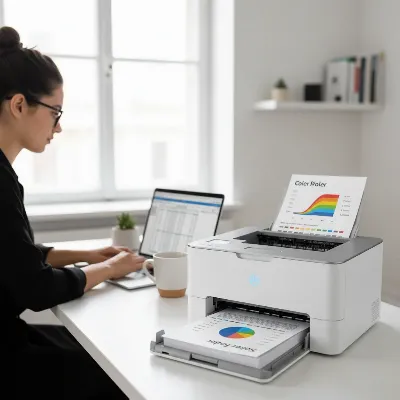 A compact color laser printer in a modern small business office setup, with a professional looking document being printed
Key Factors When Choosing a Color Laser Printer (Buying Guide)
Selecting the best color laser printer for your small business involves more than just picking a popular model. A thoughtful evaluation of your specific needs and the printer’s capabilities will ensure a smart, long-lasting investment.
Your Business Needs
Start by precisely defining what your business requires from a printer. What type of documents do you print most often? (e.g., text-heavy reports, marketing brochures with graphics, client presentations, invoices). If high-quality color graphics are paramount, ensure the printer excels in that area. Consider your average print volume and frequency. A high-volume office printing hundreds or thousands of pages monthly will need a more robust machine with a higher duty cycle and larger paper capacity than a home-based business with occasional printing needs. Do you require additional functions like scanning, copying, or faxing? If so, an All-in-One (multifunction) printer will be more suitable, offering convenience and saving space.
Budget and Total Cost of Ownership (TCO)
While the initial purchase price is an obvious consideration, it’s crucial to look beyond it and calculate the Total Cost of Ownership (TCO). A cheaper printer upfront might have significantly higher running costs due to expensive toner cartridges or lower page yields. Compare the cost per page (CPP) for both black-and-white and color prints across different models. Look for printers that offer high-yield toner options, as these typically provide the lowest CPP. Also, factor in the cost and availability of replacement parts or potential maintenance, and inquire about warranty and support services. A slightly higher initial investment in a durable, efficient model with affordable toner can lead to substantial savings over its lifespan.
Performance Features
A printer’s performance directly impacts your workflow. Print speed, measured in pages per minute (PPM), is critical for busy offices. While color printing is often slower than monochrome, ensure the speed aligns with your team’s demands. Print resolution, expressed in dots per inch (DPI), determines the sharpness and detail of your output; look for at least 1200 x 1200 DPI for crisp text and vibrant graphics. Automatic duplexing (two-sided printing) is a valuable feature for saving paper and reducing environmental impact. For multifunction printers, an Automatic Document Feeder (ADF) is essential for quickly scanning or copying multi-page documents. Consider connectivity options such as Wi-Fi, Ethernet, and USB, with Wi-Fi being almost standard for flexible placement. Features like a user-friendly touchscreen interface and ample paper tray capacity also enhance usability and efficiency.
Brand Reputation and Support
Choosing a reputable brand often translates to better product quality, reliability, and customer support. Brands like HP, Canon, and Brother have long-standing reputations in the printer market. Before making a decision, research user reviews and industry reports to gauge a model’s dependability and common maintenance issues. A strong warranty and accessible customer service or technical support can be invaluable, especially for a small business where printer downtime can severely impact operations.
Top Color Laser Printers for Small Business
The market for color laser printers offers robust options tailored for various small business needs. Here are some of the standout models that combine performance, efficiency, and value.
For All-Round Multifunctionality and Security:
- HP Color LaserJet Pro MFP 4301fdw: This all-in-one device is a powerhouse for small businesses requiring print, scan, copy, and fax capabilities. It offers fast color output, automatic duplexing, versatile connectivity, and robust HP Wolf Pro Security, making it suitable for multi-user teams in demanding environments like legal, consulting, or healthcare.
For High-Volume Printing Needs:
- HP Color LaserJet Pro 4201dw: If your business focuses primarily on high-volume printing without the need for scanning or copying, the 4201dw excels. It delivers premium speed and sharp color results, making it ideal for real estate, finance, or marketing teams that frequently print client documents.
- Brother MFC-L8905CDW: A true workhorse designed for offices with substantial printing demands, this model boasts speeds up to 33 pages per minute, dual-sided printing and scanning, and a large paper capacity, making it perfect for multi-page reports.
For Smaller Teams and Budget-Conscious Businesses:
- HP Color LaserJet Pro 3201dw: A compact and affordable option, the 3201dw is designed for small and home-based businesses with moderate printing needs. It offers good print speeds (up to 26 ppm), two-sided color printing, and reliable wireless connectivity with HP Wolf Pro Security.
- Brother HL-L3295CDW: This single-function color laser printer stands out for budget buyers who print a lot. It offers excellent print quality, competitive toner costs, and a wide range of connection options, making it a strong contender for high-quality color output on a budget.
- Xerox C235: A compact all-in-one color laser printer, the C235 provides superb print quality and an easy-to-use control panel. It’s best suited for home offices or small workspaces where top-notch print quality is needed at moderate output levels.
For Professional Documents and High Page Yield:
- Canon Color imageCLASS MF665Cdw: This all-in-one color laser printer is lauded for consistently producing crisp documents and yielding thousands of pages, contributing to low long-term costs and maintenance. It’s a reliable choice for professional results in busy office environments.
- Canon Color Image Class MF656Cdw: Built for professional quality prints, this model delivers 28 pages per minute with impressive color accuracy, perfect for charts, reports, and client presentations that demand a sharp and consistent look.
For a Balanced All-Round Performance:
- HP Color LaserJet Pro MFP M283fdw: Often considered one of the most well-balanced color laser printers, it’s fast, reliable, and compact enough for many home offices. It delivers sharp, vibrant prints with automatic duplexing and comprehensive wireless support.
Selecting from these top models requires aligning their strengths with your specific operational demands, ensuring you choose a printer that empowers your business to operate efficiently and professionally.
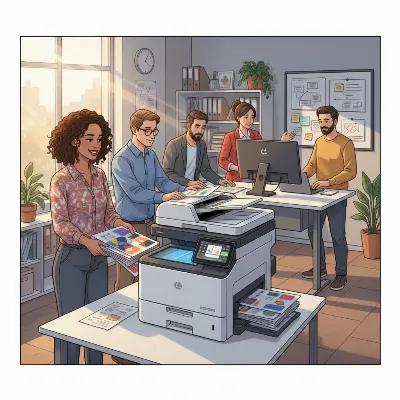 A small business team collaborating around a color laser MFP, showcasing efficient printing and scanning workflow
In the changing landscape of small business, selecting the right color laser printer is an investment in efficiency, professionalism, and long-term cost savings. By understanding the core technology, carefully weighing the advantages and disadvantages, and aligning a printer’s features with your unique business needs, you can make an informed decision. The models highlighted, from HP’s robust security features to Brother’s high-volume workhorses and Canon’s professional-grade output, demonstrate the breadth of excellent options available. Investing in the right color laser printer means empowering your team with reliable, high-quality document production, ensuring your business stands out.
Frequently Asked Questions
Are color laser printers truly more cost-effective than inkjets for a small business?
Yes, generally, for small businesses with moderate to high print volumes, color laser printers tend to be more cost-effective in the long run. While their initial purchase price is often higher, toner cartridges offer significantly higher page yields and a lower cost per page compared to inkjet cartridges, reducing ongoing expenses.
Can a compact color laser printer handle the demands of a growing small business?
Many compact color laser printers are designed with small businesses in mind and can handle moderate workloads. However, for rapidly growing businesses or those with consistently high print volumes, a model with a higher monthly duty cycle, faster print speeds, and larger paper capacity might be a more sustainable choice to avoid frequent maintenance or premature wear.
Frequently Asked Questions
What are the main advantages of color laser printers for small businesses?
Color laser printers offer several key advantages for small businesses, including superior print quality with sharp text and graphics, faster print speeds for high-volume tasks, and long-term cost-effectiveness due to lower cost per page with high-yield toner cartridges. They also provide durability and reliability for substantial workloads.
What are the disadvantages of using a color laser printer?
Despite their benefits, color laser printers have drawbacks such as a higher upfront cost compared to inkjet models and a larger, heavier footprint. They also have limitations for photo printing, often struggling with smooth gradients, and tend to have higher energy consumption due to the fuser unit requiring heat.
Should a small business choose a standard or multifunction color laser printer?
A small business should choose based on its specific needs. Standard color laser printers are ideal if the primary requirement is high-quality color printing only. Multifunction (All-in-One) color laser printers are better for businesses needing printing, scanning, copying, and often faxing in one device, saving space and streamlining operations.
How important is Total Cost of Ownership (TCO) when buying a laser printer?
Total Cost of Ownership (TCO) is crucial when buying a laser printer because it accounts for more than just the initial purchase price. It includes ongoing expenses like toner cartridges and maintenance. A printer with a lower cost per page (CPP) and high-yield toner options can lead to substantial savings over its lifespan, even if the upfront cost is higher.
Are color laser printers truly more cost-effective than inkjets for a small business?
Yes, generally, for small businesses with moderate to high print volumes, color laser printers tend to be more cost-effective in the long run. While their initial purchase price is often higher, toner cartridges offer significantly higher page yields and a lower cost per page compared to inkjet cartridges, reducing ongoing expenses.
Can a compact color laser printer handle the demands of a growing small business?
Many compact color laser printers are designed with small businesses in mind and can handle moderate workloads. However, for rapidly growing businesses or those with consistently high print volumes, a model with a higher monthly duty cycle, faster print speeds, and larger paper capacity might be a more sustainable choice to avoid frequent maintenance or premature wear.
Get our weekly buyer guide
Practical specs, not advice. Unsubscribe anytime.

The Brother MFC-L8905CDW has been an absolute workhorse for our busy real estate office. We print a ton of property listings and contracts daily, so high-volume needs are a big deal for us. This printer just keeps going, and the toner lasts forever. It’s made a huge difference in our workflow and overall efficiency.
I appreciate the explanation of how laser printers work; it really helped me understand the difference from inkjet. I went with the HP Color LaserJet Pro 3201dw for my small design studio. It’s been great for proofs and client mock-ups, offering professional document production without breaking the bank. The setup was pretty straightforward too.
I finally upgraded to the HP Color LaserJet Pro MFP 4301fdw for my home office, and it’s been a game-changer. The multifunctionality is fantastic, and the print quality for marketing materials is incredibly sharp. It handles everything from scanning invoices to printing vibrant brochures without a hitch. Definitely worth the investment for a small business.
I picked up the Brother HL-L3295CDW because I needed a budget-conscious option for my small consulting firm. It does a decent job with everyday documents, and the color is fine for internal reports. My only real complaint is that it’s a bit slower than I expected when printing larger color presentations. For the price, it’s okay, but I might consider something faster next time.