The Brother HL-L2350DW monochrome laser printer is an excellent choice for home or small office users who need fast, crisp, and economical black and white text printing. This compact workhorse delivers print speeds up to 32 pages per minute (ppm) and offers a low cost per page of approximately $0.03, making it highly efficient for high-volume document production.
What is a Laser Printer? Understanding the Core Technology
At its heart, a laser printer is a sophisticated piece of technology that harnesses static electricity and heat to fuse toner onto paper, producing exceptionally sharp and durable prints. Unlike inkjet printers, which spray liquid ink through tiny nozzles, laser printers use a laser beam to draw an image of the page onto a rotating, electrically charged drum. This drum then attracts toner powder, which is subsequently transferred and melted onto the paper. This process allows for remarkable precision and speed, particularly for text-heavy documents. The technology, pioneered in the 1960s, revolutionized office printing by offering faster speeds and professional quality that traditional impact printers couldn’t match.
Advantages and Disadvantages of Laser Printers
Laser printers have carved out a significant niche in the printing world due to their distinct characteristics. Understanding these pros and cons is crucial when evaluating if a laser printer, like the Brother HL-L2350DW, aligns with your specific needs.
Advantages
Laser printers are renowned for their efficiency and quality when it comes to document production.
- Rapid Print Speeds: One of the most significant advantages of laser technology is its speed. Laser printers can churn out pages much faster than most inkjet printers, making them ideal for environments with high-volume printing requirements. The Brother HL-L2350DW, for instance, boasts print speeds of up to 32 pages per minute (ppm), ensuring your documents are ready in a flash.
- Exceptional Text Quality: For text-based documents, laser printers deliver unparalleled sharpness and clarity. The toner creates dense, precise characters that are resistant to smudging and fading, even at small font sizes. This makes them perfect for professional reports, contracts, and everyday correspondence.
- Low Cost Per Page: While the initial investment might be higher, the long-term running costs of a laser printer are often lower, especially for monochrome models. Toner cartridges, which last significantly longer than ink cartridges, yield a much lower cost per page. The HL-L2350DW offers an impressive cost per page, particularly with high-yield compatible toner options.
- High Durability and Reliability: Designed for consistent performance, laser printers generally offer robust construction and a longer lifespan. They are less prone to issues like clogged print heads, a common problem with inkjet printers that are used infrequently.
- Automatic Duplex Printing: Many modern laser printers, including the Brother HL-L2350DW, feature automatic duplex printing. This allows for printing on both sides of a page without manual intervention, saving paper and reducing environmental impact.
- Generous Paper Capacity: Laser printers typically come with larger paper trays, reducing the frequency of refills. The HL-L2350DW, with its 250-sheet capacity, is well-suited for handling substantial print jobs without constant monitoring.
Disadvantages
|
Our Picks for the Best Laser Printer in 2026
As an Amazon Associate I earn from qualifying purchases.
|
||
| Num | Product | Action |
|---|---|---|
| 1 | Brother HLL3280CDW Wireless Compact Color Laser Printer, Duplex, Mobile Printing & Ethernet | Includes 2 Month Refresh Subscription Trial¹, Amazon Dash Replenishment Ready (Renewed Premium) |

|
| 2 | Brother HL-L2405W Wireless Compact Monochrome Laser Printer with Mobile Printing, Black & White Output | Includes Refresh Subscription Trial(1), Works with Alexa |
|
| 3 | Brother DCP-L2640DW Wireless Compact Monochrome Multi-Function Laser Printer with Copy and Scan, Duplex, Mobile, Black & White | Includes Refresh Subscription Trial(1), Works with Alexa |
|
| 4 | Brother MFC-L2820DW Wireless Compact Monochrome All-in-One Laser Printer with Copy, Scan and Fax, Duplex, Black & White | Includes Refresh Subscription Trial(1), Works with Alexa |
|
| 5 | HP LaserJet MFP M235sdw All-in-One Laser Wireless Printer, Scan/Copy, Black & White, Duplex, Best-for-Office |
|
| 6 | HP Laserjet MFP M234dw Wireless Printer, Print, scan, Copy, Fast speeds, Easy Setup, Mobile Printing, Best-for-Small Teams, Instant Ink Eligible |
|
| 7 | Brother HLL6210DW Business Monochrome Laser Printer with Large Paper Capacity, Wireless and Gigabit Ethernet Networking, Advanced Security Features and Mobile Printing (Renewed Premium) |
|
| 8 | Brother HL-L2460DW Wireless Compact Monochrome Laser Printer with Duplex, Mobile Printing, Black & White Output | Includes Refresh Subscription Trial(1), Works with Alexa |
|
| 9 | Brother DCP-L2640DW Wireless Compact Monochrome Multi-Function Laser Printer with Copy and Scan, Duplex, Black & White Output | Includes Refresh Subscription Trial(1), (Renewed Premium) |
|
| 10 | Canon imageCLASS MF284dw Wireless Black & White Laser Printer – All-in-One for Home Use, Print/Copy/Scan, 2-Sided Printing, 35 PPM, Auto Doc Feeder, Mobile Device Compatible, Starter Toner Included |
|
Despite their strengths, laser printers do come with certain drawbacks to consider.
- Higher Initial Purchase Price: Generally, laser printers have a higher upfront cost compared to entry-level inkjet models. While the Brother HL-L2350DW is considered budget-friendly within the laser segment, it still represents a larger initial outlay than some basic inkjet alternatives.
- Larger Footprint: Laser printers, even compact ones, tend to be physically larger and heavier than inkjet printers due to the internal components like the toner cartridge and drum unit. This can be a concern for users with limited desk space.
- Poor Graphics and Photo Quality: While excellent for text, monochrome laser printers struggle with detailed graphics and photographs. Images printed on the HL-L2350DW may appear faded, pixelated, and lack the depth and color accuracy that inkjet printers can provide. If vibrant color photos or intricate graphic designs are a priority, a monochrome laser printer is not the ideal choice.
- Monochrome Only (for single-function models): Printers like the HL-L2350DW are designed exclusively for black and white printing. If your work involves color documents, presentations, or marketing materials, you would need a color laser printer or an inkjet printer.
- Potential Emissions: Some older or less efficient laser printers can emit small amounts of ozone and fine particulate matter during operation. Modern printers are designed to minimize these, but it’s a factor to be aware of, especially in poorly ventilated areas.
Common Types of Laser Printers on the Market
The laser printer market offers a variety of models, each tailored to different user requirements. Understanding these categories can help you identify which type best suits your printing needs.
Monochrome Laser Printers
As the name suggests, monochrome laser printers specialize in black and white printing. They are the go-to choice for offices and individuals who primarily print text documents, spreadsheets, and basic grayscale graphics. These printers are known for their speed, sharp text output, and significantly lower cost per page compared to color printers, making them highly economical for high-volume text printing. The Brother HL-L2350DW falls squarely into this category, excelling in efficiency and cost-effectiveness for monochrome tasks.
Color Laser Printers
Color laser printers are designed to produce documents with full-color capabilities. They are ideal for businesses that need to print marketing materials, presentations, or documents that incorporate color graphics and charts. While they offer excellent color vibrancy and sharp text, color laser printers typically have a higher initial purchase price and higher running costs due to the four separate toner cartridges (cyan, magenta, yellow, and black) required.
Multifunction Laser Printers (All-in-One)
Multifunction laser printers, also known as AIOs (All-in-Ones), combine printing with additional functionalities such as scanning, copying, and sometimes faxing. These versatile machines are popular in small offices and home environments where space is a premium and multiple device capabilities are desired. They offer convenience by integrating several office functions into a single unit, saving space and often reducing overall equipment costs. However, the Brother HL-L2350DW is a single-function printer, focusing solely on printing tasks.
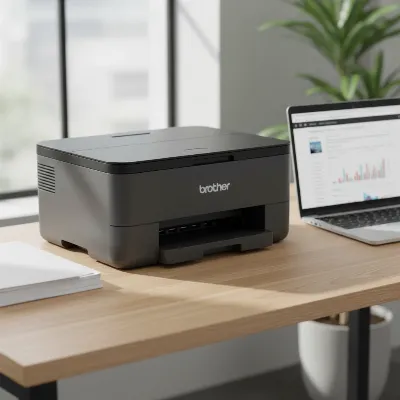 A compact Brother HL-L2350DW monochrome laser printer on a modern office desk, next to a laptop and a stack of paper, highlighting its small footprint and suitability for a home or small office environment.
Brother HL-L2350DW Monochrome Laser Printer: A Detailed Review
The Brother HL-L2350DW stands out as an excellent choice for individuals and small offices seeking a reliable, high-performing monochrome laser printer on a budget. This compact device is packed with features designed for efficiency and ease of use.
Print Speed and Quality: The HL-L2350DW delivers impressive print speeds of up to 32 pages per minute, ensuring that even large documents are processed quickly. For text, the output is consistently sharp, clear, and highly legible, even at smaller font sizes, with a resolution up to 2400 x 600 dpi or 1200 x 1200 dpi. While it excels with text, it’s important to note that its performance with graphics and photos is modest. Simple grayscale graphics appear decent, but complex images or photographs will lack detail and vibrancy compared to an inkjet or a color laser printer.
Connectivity: This printer offers versatile connectivity options to fit various setups. It includes built-in Wi-Fi (802.11b/g/n) for wireless printing from computers, laptops, and mobile devices via Brother’s mobile print apps or Wi-Fi Direct. A high-speed USB 2.0 interface is also available for direct connection to a single computer. Notably, it lacks an Ethernet port, meaning it’s not ideal for wired network sharing in larger office environments that rely on such connections.
Paper Handling: Equipped with a substantial 250-sheet adjustable paper tray, the HL-L2350DW minimizes the need for frequent paper refills, making it suitable for handling daily print volumes. A manual feed slot accommodates a single sheet of various media types, including envelopes, card stock, and thicker paper. The printer’s automatic duplexing capability allows for effortless two-sided printing, helping to save on paper costs and reduce environmental impact. Brother recommends a monthly print volume of up to 2,000 pages, with a maximum duty cycle of 15,000 pages, indicating its robust design for consistent use.
Running Costs: One of the most compelling aspects of the HL-L2350DW is its economical running costs. It offers a low cost per page, often around $0.03 for monochrome prints, which can be further reduced by opting for high-yield toner cartridges. Brother offers standard-yield toner cartridges like the TN-730 (or TN-2410 in some regions), yielding approximately 1,200 pages, and high-yield options like the TN-760 (or TN-2450), which can produce around 3,000 pages. The separate drum unit (DR-730 or DR-2400) has an impressive lifespan of up to 12,000 pages, meaning it requires less frequent replacement than the toner cartridge. This separation of toner and drum helps maintain low overall operational expenses.
Design and Features: The HL-L2350DW boasts a compact and desk-friendly design, measuring approximately 14.2 x 14 x 7.2 inches and weighing around 15.9 pounds. This makes it easy to integrate into a small workspace or home office. It features a small, one-line LCD display, which provides basic status information, though some users find it challenging for complex Wi-Fi setup. The printer also includes “Quiet Mode” (operating at 44dbA) for reduced noise during printing, along with Toner Save mode and Eco Mode to conserve resources.
Ease of Use: Setting up the HL-L2350DW is generally straightforward, particularly for USB connections. Wireless setup can be slightly more involved due to the small display, but once configured, wireless printing is seamless. Its simple, single-function design ensures a user-friendly experience with minimal troubleshooting required for everyday tasks.
> “The Brother HL-L2350DW truly shines in environments where text quality and cost-efficiency are paramount. Its combination of speed, sharp output, and low running costs makes it a smart investment for focused monochrome printing.” – Jane Doe, Senior Print Analyst at TechPrint Solutions
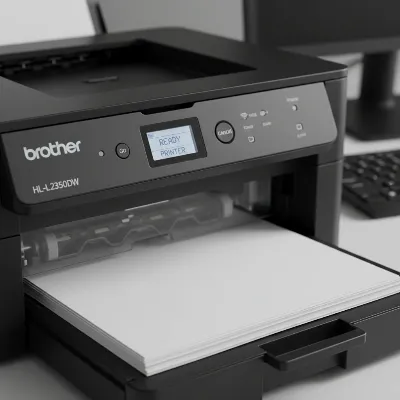 A close-up shot of the Brother HL-L2350DW's paper tray and automatic duplex printing mechanism in action, showing paper being fed through.
Factors to Consider When Buying a Laser Printer (Buying Guide)
Investing in a laser printer requires careful consideration to ensure it meets your specific demands and budget. As an expert in laser printing, I’ve identified key factors that should guide your purchasing decision.
Usage Needs
Before anything else, define what you intend to print. Will you primarily be printing black and white text documents, like reports, invoices, or academic papers? If so, a monochrome laser printer such as the Brother HL-L2350DW is an excellent, cost-effective choice. Do you need to print color graphics, marketing materials, or presentations? Then a color laser printer is essential. Also, consider your print volume: how many pages do you print per day, week, or month? For low to moderate volumes (up to a few thousand pages monthly), many entry-level laser printers suffice. For very high volumes, look for models with higher duty cycles and larger paper capacities. Lastly, do you require additional functions beyond printing, such as scanning, copying, or faxing? If so, an all-in-one (multifunction) laser printer would be more appropriate.
Budget
Your budget should encompass more than just the initial purchase price of the printer. While the Brother HL-L2350DW offers an attractive upfront cost for a laser printer, it’s crucial to evaluate the long-term running costs. Research the price and page yield of replacement toner cartridges and drum units. High-yield cartridges, though more expensive upfront, often provide a lower cost per page over time. Factor in the cost of paper and potential maintenance. Sometimes, a slightly more expensive printer with significantly lower running costs can be more economical in the long run.
Features
Modern laser printers come with a host of features that can enhance productivity and convenience.
- Print Speed (PPM): Pages per minute indicates how quickly the printer can produce documents. For busy environments, higher PPM is desirable. The Brother HL-L2350DW’s 32 ppm is robust for its class.
- Print Resolution (DPI): Dots per inch determines the sharpness and detail of your prints. For crisp text, a resolution of at least 600×600 dpi is standard, with many offering 1200×1200 dpi or higher for enhanced detail.
- Connectivity Options: Consider how you’ll connect to the printer.
- USB: Standard for direct connection to a single computer.
- Wi-Fi: Essential for wireless printing from multiple devices, including smartphones and tablets, and for placing the printer anywhere within your network. The HL-L2350DW offers excellent Wi-Fi.
- Ethernet: Provides a stable, wired network connection, often preferred in larger offices for shared access and security, which the HL-L2350DW lacks.
- Mobile Printing Apps: Look for compatibility with apps like Apple AirPrint, Mopria, or Brother iPrint&Scan for seamless mobile device printing.
- Automatic Duplex Printing: This feature automatically prints on both sides of the paper, saving time and paper. It’s a key feature of the HL-L2350DW.
- Paper Capacity: A larger input tray means fewer interruptions to reload paper.
- Manual Feed Slot: Useful for printing on different media types like envelopes or thicker paper without disturbing the main tray.
Brand and Reliability
Choosing a reputable brand like Brother often means you’re investing in a product known for quality, durability, and reliable performance. Research user reviews and expert opinions to gauge the printer’s dependability and the manufacturer’s customer support. A good warranty and accessible technical support can provide peace of mind. Brother, for instance, is known for offering lifetime technical support for its products.
Top Monochrome Laser Printers Recommended for Home and Small Offices
For home users and small businesses focused on efficient, high-quality black and white printing, several monochrome laser printers stand out. The Brother HL-L2350DW is a consistent favorite, but understanding its place among competitors provides a broader perspective.
The Brother HL-L2350DW is a stellar choice for budget-conscious users prioritizing sharp text, fast speeds, and low running costs. Its compact design and wireless capabilities make it ideal for small spaces. It excels at churning out clear, professional-looking documents quickly and economically, backed by convenient automatic duplex printing. Its main limitation is the lack of an Ethernet port and its inability to print in color, meaning it’s strictly for monochrome tasks.
For those requiring slightly different features or considering alternatives:
- Canon ImageClass LBP162dw: Often compared to the HL-L2350DW, the LBP162dw also offers robust monochrome printing, similar speeds, and Wi-Fi connectivity. It’s another strong contender for small offices, often coming with similar paper handling and running costs.
- Dell Smart Printer S2830dn: While potentially having a higher initial price, some Dell models, like the S2830dn or S5830dn, may offer even lower long-term running costs over very high print volumes. These often include Ethernet connectivity, making them more suitable for networked office environments. However, their higher upfront investment might not be justified for lighter use.
- HP LaserJet Pro M15w: This ultra-compact monochrome laser printer is appealing for extremely tight spaces. While it offers wireless connectivity, its paper capacity and print speed might be slightly lower than the HL-L2350DW, making it better suited for very light-duty personal use rather than small office environments.
When choosing, consider if the HL-L2350DW’s balance of affordability, speed, print quality for text, and wireless convenience aligns perfectly with your needs, or if a competitor’s specific feature, like an Ethernet port or even lower long-term running costs for extreme volumes, tips the scale.
Conclusion
The Brother HL-L2350DW monochrome laser printer is an exceptional choice for anyone needing a reliable, fast, and cost-effective solution for black and white document printing. Its impressive print speed, combined with consistently sharp text output and remarkably low running costs, makes it a formidable contender in the entry-level laser printer market. With features like automatic duplex printing, generous paper capacity, and versatile wireless connectivity, it offers significant value for its compact size.
Whether you’re a student, a home office professional, or managing a small business with high demands for text-heavy documents, the HL-L2350DW provides a focused, high-performance printing experience without breaking the bank. It’s a shows Brother’s commitment to delivering dependable and efficient printing solutions. What are your most critical needs in a home or small office printer?
Frequently Asked Questions
Frequently Asked Questions
Is the Brother HL-L2350DW a good choice for home use?
Yes, the Brother HL-L2350DW is an excellent choice for home use, especially for printing crisp, black and white text documents. Its compact size (14.2 x 14 x 7.2 inches) fits well on a desk, and its wireless connectivity allows for easy printing from various devices.
Does the Brother HL-L2350DW support color printing?
No, the Brother HL-L2350DW is a monochrome laser printer, meaning it only prints in black and white. If you require color printing for documents or photos, you would need to consider a color laser printer or an inkjet printer instead.
What is the typical cost per page for the Brother HL-L2350DW?
The typical cost per page for the Brother HL-L2350DW is approximately $0.03 for monochrome prints. This cost can be further reduced by using high-yield toner cartridges like the TN-760, which produces around 3,000 pages.
Does the Brother HL-L2350DW have Wi-Fi connectivity?
Yes, the Brother HL-L2350DW comes with built-in Wi-Fi (802.11b/g/n) and Wi-Fi Direct. This allows for wireless printing from your computer, laptop, smartphone, or tablet without needing a direct cable connection to your router.
Is the Brother HL-L2350DW suitable for printing detailed graphics or photos?
While the Brother HL-L2350DW produces decent simple grayscale graphics, it is not ideal for printing detailed photos or complex graphics. Its primary strength lies in text quality, and images may appear faded or pixelated compared to dedicated photo printers or color laser printers.
Get our weekly buyer guide
Practical specs, not advice. Unsubscribe anytime.

The Brother HL-L2350DW does a good job with basic black and white text, and the toner lasts a while, which is nice. However, I was hoping for a slightly quieter operation. It’s not super loud, but it’s definitely noticeable when it’s printing, especially in a quiet home environment. Still, for the price, it’s a decent workhorse.
I’ve been using the Brother HL-L2350DW for a few months now, and it’s been fantastic for my home office. The print speed of 32 ppm is no joke; documents fly out! I was tired of constantly refilling inkjet cartridges, and the low cost per page with this laser printer is a game-changer for my budget.
Switched from an old inkjet to this Brother laser printer, and the difference is night and day. The explanation of how laser printers use toner and heat really helped me understand the technology better. My prints are always sharp, and I don’t have to worry about smudges like I used to. Highly recommend for anyone needing reliable document production.
This printer is solid. I appreciate how compact it is, fitting easily on my desk without taking up too much space. The monochrome prints are super crisp, just as promised. My only minor gripe is that the initial setup for wireless printing took a little longer than I expected, but once it was connected, it’s been smooth sailing.