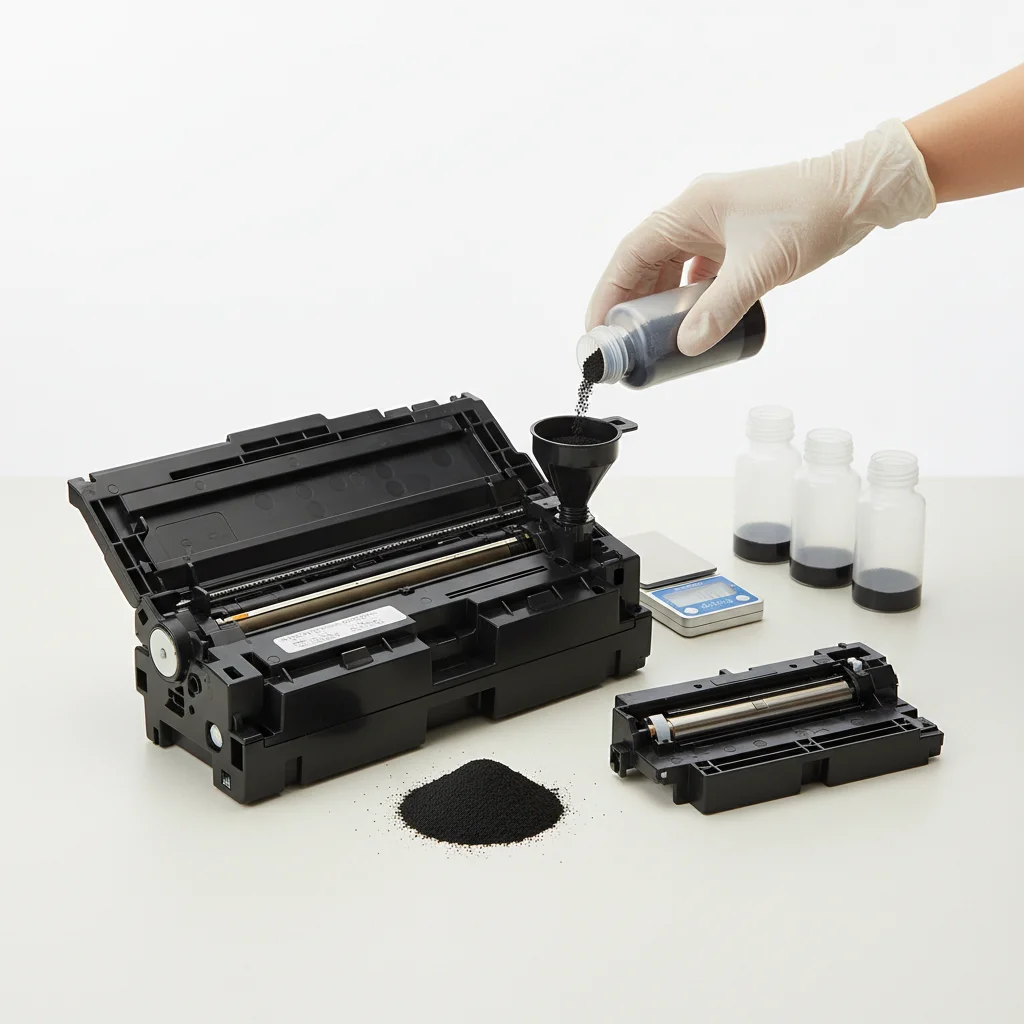
A laser printer cartridge can typically be refilled between 1 to 3 times before print quality significantly degrades. While refilling offers a cost-effective alternative to buying new, the internal components of a toner cartridge, such as the drum and wiper blade, are designed for a finite lifespan. Exceeding this limit often leads to streaky prints, faded text, or even damage to the printer itself.
Understanding Toner Cartridge Components and Wear
A standard laser printer toner cartridge is more than just a container for toner powder. It often includes a photosensitive drum, a wiper blade, a developer roller, and various seals. Each of these components experiences wear and tear with every print cycle. The drum, for instance, is coated with a light-sensitive material that can degrade over time, leading to ghosting or uneven prints. The wiper blade, responsible for cleaning residual toner from the drum, can also lose its effectiveness, causing smudges. For browse all laser printer articles on this site.
When a cartridge is refilled, only the toner powder is replaced. The worn mechanical parts remain, which is why subsequent refills often yield diminishing returns in print quality. High-quality refill services might replace some of these critical components, but this is less common for standard home or small office cartridges.
Factors Affecting Refill Viability
Several factors influence how many times a laser printer cartridge can be successfully refilled. The original cartridge’s quality plays a significant role; OEM (Original Equipment Manufacturer) cartridges are generally built with more durable components than some third-party alternatives. The type of toner used for refilling is also crucial. Using incompatible or low-quality toner can lead to poor print results, clogs, and even damage to the printer’s fuser unit.
Furthermore, the printer model itself can impact refill success. Some modern laser printers are designed with chips that monitor toner levels and can detect if a cartridge has been refilled, potentially preventing it from working correctly. Always check your printer’s specifications and warranty before attempting refills.
The Risks and Benefits of Refilling
|
Our Picks for the Best Laser Printer in 2026
As an Amazon Associate I earn from qualifying purchases.
|
||
| Num | Product | Action |
|---|---|---|
| 1 | Brother HL-L2405W Wireless Compact Monochrome Laser Printer with Mobile Printing, Black & White Output | Includes Refresh Subscription Trial(1), Works with Alexa |

|
| 2 | HP LaserJet MFP M235sdw All-in-One Laser Wireless Printer, Scan/Copy, Black & White, Duplex, Best-for-Office |
|
| 3 | HP Laserjet MFP M234dw Wireless Printer, Print, scan, Copy, Fast speeds, Easy Setup, Mobile Printing, Best-for-Small Teams, Instant Ink Eligible |
|
| 4 | Brother HLL3280CDW Wireless Compact Color Laser Printer, Duplex, Mobile Printing & Ethernet | Includes 2 Month Refresh Subscription Trial¹, Amazon Dash Replenishment Ready (Renewed Premium) |
|
| 5 | Brother DCP-L2640DW Wireless Compact Monochrome Multi-Function Laser Printer with Copy and Scan, Duplex, Mobile, Black & White | Includes Refresh Subscription Trial(1), Works with Alexa |
|
| 6 | Brother MFC-L2820DW Wireless Compact Monochrome All-in-One Laser Printer with Copy, Scan and Fax, Duplex, Black & White | Includes Refresh Subscription Trial(1), Works with Alexa |
|
| 7 | Brother DCP-L2640DW Wireless Compact Monochrome Multi-Function Laser Printer with Copy and Scan, Duplex, Black & White Output | Includes Refresh Subscription Trial(1), (Renewed Premium) |
|
| 8 | Brother HL-L2460DW Wireless Compact Monochrome Laser Printer with Duplex, Mobile Printing, Black & White Output | Includes Refresh Subscription Trial(1), Works with Alexa |
|
| 9 | Brother HLL6210DW Business Monochrome Laser Printer with Large Paper Capacity, Wireless and Gigabit Ethernet Networking, Advanced Security Features and Mobile Printing (Renewed Premium) |
|
| 10 | Canon imageCLASS MF284dw Wireless Black & White Laser Printer – All-in-One for Home Use, Print/Copy/Scan, 2-Sided Printing, 35 PPM, Auto Doc Feeder, Mobile Device Compatible, Starter Toner Included |
|
The primary benefit of refilling laser printer cartridges is cost savings. Refilled cartridges can be significantly cheaper than new OEM cartridges, making them an attractive option for budget-conscious users. Environmentally, refilling also contributes to reducing waste by extending the life of a cartridge and keeping it out of landfills.
However, there are notable risks. Poor quality refills can lead to print defects like streaks, spots, or faded text, which can be frustrating and unprofessional. In some cases, leaking toner from a poorly refilled cartridge can damage the printer’s internal mechanisms, potentially voiding its warranty. It’s essential to weigh these risks against the potential savings.
- Reduced cost per page compared to new cartridges.
- Environmental benefit by reducing landfill waste.
- Potential for lower print quality with each subsequent refill.
- Risk of printer damage from leaking or incompatible toner.
- Possible voiding of printer warranty if issues arise from refilled cartridges.
When to Consider a New Cartridge
While refilling can be a viable short-term solution, there comes a point when purchasing a new cartridge, either OEM or a reputable remanufactured one, becomes the better option. If you notice any of the following, it’s likely time for a replacement:
Consistent print quality issues that persist after a refill, such as streaking, banding, or faded areas. If your printer frequently displays error messages related to the toner cartridge, even after a refill, it could indicate a component failure within the cartridge itself. Finally, if the cost of repeated refills starts to approach the price of a new cartridge, the diminishing returns on quality and the increased risk of printer issues make a new purchase more sensible.
Choosing Between Refill, Remanufactured, and OEM
When your laser printer cartridge runs out, you have several choices. Refilling, as discussed, involves adding new toner to an existing cartridge. Remanufactured cartridges are original cartridges that have been professionally cleaned, had worn components replaced, and then refilled with new toner. OEM cartridges are brand new cartridges produced by the original printer manufacturer.
For optimal print quality and reliability, OEM cartridges are generally the safest bet, though they are the most expensive. Remanufactured cartridges offer a good balance of cost savings and quality, provided they come from a reputable supplier. Refilling is the cheapest option but carries the highest risk of quality issues and potential printer problems. Consider your budget, print quality needs, and willingness to take risks when making your decision.For those seeking a balance of cost and reliability, exploring high-quality remanufactured options can be a smart move.
Get our weekly buyer guide
Practical specs, not advice. Unsubscribe anytime.

I’ve always wondered about refilling my laser printer cartridge, and this really cleared things up. I used to just toss them after one use, but knowing I can get 1-3 refills before the print quality goes down is a game-changer for my home office budget. It’s great to save some money without sacrificing too much quality.
I’ve been looking for ways to cut down on office expenses, and refilling my laser printer cartridges seems like a smart move. I appreciate the detail about how exceeding the refill limit can actually damage the printer itself – that’s a cost I definitely want to avoid. Thanks for the clear explanation!
This was super helpful! I always thought it was just about the toner powder, but understanding that the photosensitive drum and other internal components wear out makes a lot of sense. I’ve had issues with ghosting before, and now I know why. I’ll be more mindful of how many times I refill going forward.
I tried refilling a cartridge once, and while it was cheaper, I definitely noticed the streaky prints after the second refill. I think the advice about the drum and wiper blade wearing out is spot on. It’s a good option for occasional use, but for heavy printing, I’d probably just buy a new one.