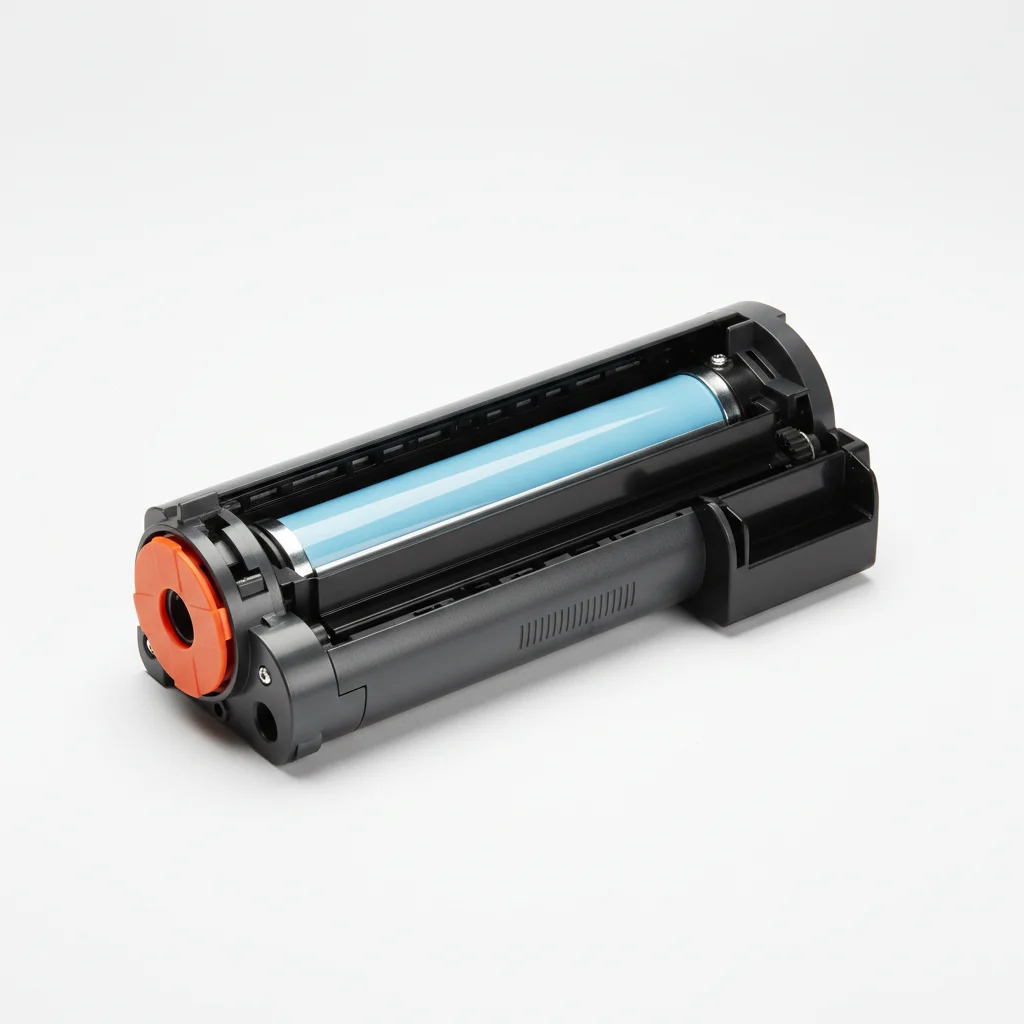
A laser printer drum unit typically lasts for 12,000 to 50,000 pages, though this can vary significantly based on the printer model, manufacturer, and usage patterns. This component is crucial for transferring toner to the paper, and its lifespan is a key factor in the overall cost of ownership for a laser printer.
Understanding the Drum Unit’s Role
The drum unit, also known as the photoconductor unit, is an electrically charged cylinder that attracts toner particles. When a page is printed, a laser beam ‘draws’ the image onto the drum, neutralizing the charge in specific areas. Toner then adheres to these areas, and the drum rolls over the paper, transferring the toner to create the print. Over time, the drum’s photosensitive coating wears down, leading to print quality degradation. For more laser printer guides on this site.
Some laser printers integrate the drum unit directly into the toner cartridge, while others have it as a separate, replaceable component. Printers with separate drum units often have a lower cost per page for consumables, as the drum is replaced less frequently than the toner cartridge.
Factors Influencing Drum Lifespan
Several factors can impact how long your laser printer drum unit will last. Print volume is the most obvious; the more pages you print, the faster the drum will wear out. The type of printing also plays a role. Printing graphics or images that require heavy toner coverage can put more stress on the drum than printing text-only documents. Environmental conditions, such as humidity and temperature, can also affect the drum’s performance and longevity.
- Print Volume: Higher page counts accelerate wear.
- Print Type: Graphics and heavy coverage use more drum surface.
- Paper Quality: Abrasive paper can cause premature wear.
- Environmental Factors: Humidity and temperature can impact performance.
- Maintenance: Regular cleaning can extend life.
Signs It’s Time to Replace Your Drum Unit
|
Our Picks for the Best Laser Printer in 2026
As an Amazon Associate I earn from qualifying purchases.
|
||
| Num | Product | Action |
|---|---|---|
| 1 | Canon imageCLASS MF284dw Wireless Black & White Laser Printer – All-in-One for Home Use, Print/Copy/Scan, 2-Sided Printing, 35 PPM, Auto Doc Feeder, Mobile Device Compatible, Starter Toner Included |

|
| 2 | HP LaserJet MFP M235sdw All-in-One Laser Wireless Printer, Scan/Copy, Black & White, Duplex, Best-for-Office |
|
| 3 | Brother MFC-L2820DW Wireless Compact Monochrome All-in-One Laser Printer with Copy, Scan and Fax, Duplex, Black & White | Includes Refresh Subscription Trial(1), Works with Alexa |
|
| 4 | Brother DCP-L2640DW Wireless Compact Monochrome Multi-Function Laser Printer with Copy and Scan, Duplex, Mobile, Black & White | Includes Refresh Subscription Trial(1), Works with Alexa |
|
| 5 | Brother DCP-L2640DW Wireless Compact Monochrome Multi-Function Laser Printer with Copy and Scan, Duplex, Black & White Output | Includes Refresh Subscription Trial(1), (Renewed Premium) |
|
| 6 | HP Laserjet MFP M234dw Wireless Printer, Print, scan, Copy, Fast speeds, Easy Setup, Mobile Printing, Best-for-Small Teams, Instant Ink Eligible |
|
| 7 | Brother HL-L2460DW Wireless Compact Monochrome Laser Printer with Duplex, Mobile Printing, Black & White Output | Includes Refresh Subscription Trial(1), Works with Alexa |
|
| 8 | Brother HLL6210DW Business Monochrome Laser Printer with Large Paper Capacity, Wireless and Gigabit Ethernet Networking, Advanced Security Features and Mobile Printing (Renewed Premium) |
|
| 9 | Brother HL-L2405W Wireless Compact Monochrome Laser Printer with Mobile Printing, Black & White Output | Includes Refresh Subscription Trial(1), Works with Alexa |
|
| 10 | Brother HLL3280CDW Wireless Compact Color Laser Printer, Duplex, Mobile Printing & Ethernet | Includes 2 Month Refresh Subscription Trial¹, Amazon Dash Replenishment Ready (Renewed Premium) |
|
Recognizing when your drum unit needs replacement is crucial for maintaining print quality. Common indicators include faded prints, streaks, lines, or spots appearing on every page, even after replacing the toner cartridge. Ghosting, where faint images of previous prints appear on new pages, is another tell-tale sign. Many modern laser printers will also display a warning message on their control panel or through their software when the drum unit is nearing the end of its life.
Ignoring these warnings can lead to increasingly poor print quality and potentially damage other printer components. It’s always best to replace the drum unit promptly once these symptoms become apparent.
Maximizing Your Drum Unit’s Life
While drum units have a finite lifespan, there are steps you can take to maximize their longevity. Using high-quality toner cartridges from reputable manufacturers can prevent damage from inferior toner particles. Storing your printer in a stable environment, away from extreme temperatures and humidity, also helps. Additionally, following the manufacturer’s recommended maintenance schedule, which may include occasional cleaning of the drum unit or surrounding areas, can contribute to a longer life.
Avoid touching the drum’s surface directly with your bare hands, as oils and dirt can degrade its photosensitive coating. Always handle the drum unit by its designated grips or edges when performing maintenance or replacement.
Separate vs. Integrated Drum Units
The decision between a printer with a separate drum unit and one with an integrated drum in the toner cartridge often comes down to cost and convenience. Printers with separate drums typically have a lower cost per page because you only replace the toner when it runs out and the drum much less frequently. This can be more economical for high-volume users. However, replacing a separate drum unit can be a slightly more involved process.
Printers with integrated drum and toner cartridges offer greater convenience, as every time you replace the toner, you’re also getting a fresh drum. This can simplify maintenance and ensure consistent print quality. However, it often results in a higher cost per page, as you’re replacing a perfectly good drum every time the toner runs out.
Get our weekly buyer guide
Practical specs, not advice. Unsubscribe anytime.
