The Xerox WorkCentre 6515 is a color laser-class LED multifunction printer (MFP) designed for small to medium-sized businesses and busy home offices, offering print, scan, copy, and fax capabilities. It delivers fast print speeds of up to 28 pages per minute (ppm) for both color and black and white, with a print resolution of 1200 x 2400 dpi, ensuring sharp text and vivid graphics. Its 5-inch color touchscreen and single-pass duplex scanning enhance user experience and efficiency.
What is a Laser Printer? (Definition and Operating Principle)
A laser printer is an electrographic printer that rapidly produces high-quality text and graphics on plain paper. Unlike inkjet printers that spray liquid ink through tiny nozzles, laser printers use a laser beam to draw an image onto a photosensitive drum. This drum then attracts toner powder, which is subsequently transferred and fused onto the paper using heat and pressure, resulting in a durable and crisp print.
The Xerox WorkCentre 6515, for instance, is classified as a color laser-class LED multifunction printer (MFP). While technically using an LED array rather than a laser, it operates on the same core principles as a laser printer, offering the characteristic speed and quality. As an MFP, it integrates print, scan, copy, and fax functionalities into a single device, making it a comprehensive solution for diverse office tasks.
Advantages and Disadvantages of Laser Printers
Laser printers are workhorses designed for efficiency and high output, but like all technologies, they come with their own set of pros and cons. Understanding these can help clarify if a laser printer, and specifically a model like the Xerox WorkCentre 6515, is the right choice for your environment.
Advantages
Laser printers are renowned for their fast print speeds, often outperforming inkjet counterparts, especially for high-volume text documents. This efficiency is crucial in busy office settings where time is of the essence. They deliver sharp, high-resolution print quality, particularly for text, producing crisp characters that are ideal for professional documents and reports. The cost per page is generally low, especially for monochrome printing, making them economical in the long run. Finally, laser printers are known for their durability and reliability, with toner cartridges lasting significantly longer than ink cartridges, reducing frequent replacements and maintenance.
Disadvantages
Despite their many benefits, laser printers typically come with a higher initial purchase price compared to basic inkjet models. Their internal components and toner cartridges also tend to be more expensive upfront. Laser printers, including the Xerox WorkCentre 6515, are generally larger in size than most inkjet printers, requiring more dedicated desk or floor space. This can be a consideration for compact home offices. Some laser printers can also emit small amounts of ozone during operation, though modern designs minimize this. While laser printers excel at text and graphics, photo quality can sometimes be less nuanced than dedicated photo inkjet printers, and repair costs, when necessary, can be higher due to specialized components.
Popular Types of Laser Printers on the Market
The laser printer market offers a variety of models, each tailored to specific needs. These can generally be categorized by their primary function and color capabilities. The Xerox WorkCentre 6515 exemplifies a popular and versatile type: the color multifunction laser printer.
Monochrome (Black and White) Laser Printers
|
Our Picks for the Best Laser Printer in 2026
As an Amazon Associate I earn from qualifying purchases.
|
||
| Num | Product | Action |
|---|---|---|
| 1 | Brother HL-L2460DW Wireless Compact Monochrome Laser Printer with Duplex, Mobile Printing, Black & White Output | Includes Refresh Subscription Trial(1), Works with Alexa |

|
| 2 | HP Laserjet MFP M234dw Wireless Printer, Print, scan, Copy, Fast speeds, Easy Setup, Mobile Printing, Best-for-Small Teams, Instant Ink Eligible |
|
| 3 | Brother MFC-L2820DW Wireless Compact Monochrome All-in-One Laser Printer with Copy, Scan and Fax, Duplex, Black & White | Includes Refresh Subscription Trial(1), Works with Alexa |
|
| 4 | Brother HL-L2405W Wireless Compact Monochrome Laser Printer with Mobile Printing, Black & White Output | Includes Refresh Subscription Trial(1), Works with Alexa |
|
| 5 | Brother DCP-L2640DW Wireless Compact Monochrome Multi-Function Laser Printer with Copy and Scan, Duplex, Mobile, Black & White | Includes Refresh Subscription Trial(1), Works with Alexa |
|
| 6 | Brother HLL3280CDW Wireless Compact Color Laser Printer, Duplex, Mobile Printing & Ethernet | Includes 2 Month Refresh Subscription Trial¹, Amazon Dash Replenishment Ready (Renewed Premium) |
|
| 7 | Canon imageCLASS MF284dw Wireless Black & White Laser Printer – All-in-One for Home Use, Print/Copy/Scan, 2-Sided Printing, 35 PPM, Auto Doc Feeder, Mobile Device Compatible, Starter Toner Included |
|
| 8 | Brother HLL6210DW Business Monochrome Laser Printer with Large Paper Capacity, Wireless and Gigabit Ethernet Networking, Advanced Security Features and Mobile Printing (Renewed Premium) |
|
| 9 | HP LaserJet MFP M235sdw All-in-One Laser Wireless Printer, Scan/Copy, Black & White, Duplex, Best-for-Office |
|
| 10 | Brother DCP-L2640DW Wireless Compact Monochrome Multi-Function Laser Printer with Copy and Scan, Duplex, Black & White Output | Includes Refresh Subscription Trial(1), (Renewed Premium) |
|
These are designed purely for printing text and graphics in black and white. They are often the most economical choice for offices that primarily deal with documents, invoices, and reports where color is not a requirement. Monochrome laser printers are known for their exceptional speed and very low cost per page for black and white prints, making them highly efficient for high-volume text output.
Color Laser Printers
Color laser printers, like the Xerox WorkCentre 6515, are capable of producing documents with a full spectrum of colors. They are essential for businesses that need to print marketing materials, presentations, charts, or any document where visual impact and brand consistency are important. While the cost per color page is higher than monochrome, they offer a significant upgrade in versatility and professionalism compared to monochrome models. The 6515, with its advanced LED technology, delivers vibrant and solid colors suitable for various business applications.
Multifunction (All-in-One) Laser Printers
Multifunction printers (MFPs), also known as all-in-one printers, combine printing with other essential office functions: scanning, copying, and often faxing. The Xerox WorkCentre 6515 is a prime example of a robust MFP, offering print, scan, copy, and fax capabilities within a single unit. This integration saves space and cost, making it an ideal solution for small to medium-sized businesses and workgroups that require a comprehensive document management system without needing separate machines for each task. The 6515’s single-pass duplex automatic document feeder (ADF) for scanning further enhances its multifunctionality.
Comparison Table of Laser Printer Models
When evaluating a printer like the Xerox WorkCentre 6515, it’s helpful to compare its specifications and features against other models in the market, including its successor. This table provides a snapshot of key data points for context.
| Feature | Xerox WorkCentre 6515/DNI (Color LED MFP) | Xerox VersaLink C405 (Color Laser MFP) | Epson WF-C5790 (Color Business Inkjet MFP) |
|---|---|---|---|
| Print Technology | LED (Laser-Class) | Laser | PrecisionCore Inkjet |
| Functions | Print, Scan, Copy, Fax | Print, Scan, Copy, Fax | Print, Scan, Copy, Fax |
| Print Speed (ppm A4 B&W/Color) | Up to 28 ppm | Up to 35 ppm | Up to 24 ppm |
| Duplex Print/Scan | Yes (Single-Pass Scan) | Yes (Single-Pass Scan) | Yes (Single-Pass Scan) |
| Print Resolution (dpi) | 1200 x 2400 | 600 x 600 (enhanced) | Up to 4800 x 1200 |
| Connectivity | USB 3.0, Ethernet, Wi-Fi, Wi-Fi Direct | USB, Ethernet, Wi-Fi, NFC | USB, Ethernet, Wi-Fi, Wi-Fi Direct |
| Standard Paper Capacity | 300 sheets (250 tray, 50 bypass) | 700 sheets (550 tray, 150 bypass) | 330 sheets (250 tray, 80 bypass) |
| Recommended Monthly Volume | Up to 4,000 pages | Up to 5,000 pages | Up to 2,500 pages |
| Control Panel | 5-inch Color Touchscreen | 5-inch Color Touchscreen | 4.3-inch Color Touchscreen |
This comparison highlights that while the 6515 offers strong resolution and comprehensive features for its class, newer models or different technologies (like business inkjets) can offer advantages in speed, paper capacity, or even print resolution depending on specific needs. The WorkCentre 6515’s direct replacement is the Xerox C315, which continues to build on its legacy with updated features.
Factors to Consider When Buying a Laser Printer (Buying Guide)
Choosing the right laser printer involves more than just looking at the price tag. It requires a thoughtful assessment of your specific printing environment, financial constraints, and functional demands. The Xerox WorkCentre 6515 serves as an excellent case study for what to evaluate.
Usage Needs
Begin by defining what you primarily need the printer for. Will it be predominantly for black and white text documents, or do you require vibrant color prints for marketing materials and presentations? Consider your print volume: how many pages do you print daily or monthly? The Xerox WorkCentre 6515, with its recommended monthly volume of up to 4,000 pages, is well-suited for small to medium workgroups or busy home offices. If you need to scan, copy, or fax frequently, an MFP like the 6515 with its single-pass duplex scanning feature offers significant convenience.
Budget
Your budget should encompass both the initial purchase price of the printer and the ongoing running costs. While the Xerox WorkCentre 6515 might have a moderate upfront cost, it’s crucial to factor in the price of toner cartridges and their page yield. High-capacity toner options for the 6515 can offer a lower cost per page in the long run. Also, consider potential maintenance or service contract costs, which can impact your total cost of ownership over the printer’s lifespan.
Features
Modern laser printers come packed with features, and prioritizing them based on your workflow is key. Print speed (the 6515 offers up to 28 ppm), print resolution (1200 x 2400 dpi on the 6515 provides excellent sharpness), and connectivity options (Wi-Fi, Ethernet, USB, Wi-Fi Direct on the 6515/DNI) are paramount. Look for automatic two-sided (duplex) printing and scanning if you want to save paper and streamline document handling. A user-friendly control panel, like the 5-inch tablet-style touchscreen on the 6515, can greatly enhance daily operations. Consider paper tray capacity and the ability to handle various media types and weights.
Brand and Reliability
Choosing a reputable brand like Xerox often ensures a higher standard of quality, reliability, and customer support. The Xerox WorkCentre 6515 has been praised for its robust build and consistent performance. Always check user reviews and industry ratings to gauge long-term reliability. Understanding the warranty and available service support is also important, as it provides peace of mind for your investment. A strong brand reputation often translates into readily available parts and technical assistance should issues arise.
Top-Rated Laser Printers Currently Available
The market for laser printers is dynamic, with new models continuously refining performance and features. Among the highly regarded options for small to medium businesses, the Xerox WorkCentre 6515 has historically carved out a strong reputation for its blend of functionality, print quality, and user experience. While it has since been superseded by models like the Xerox C315, its legacy and performance characteristics remain relevant for those seeking a dependable multifunction device.
The Xerox WorkCentre 6515/DNI, in particular, stands out for its exceptional feature set, making it a compelling choice for offices needing a versatile all-in-one color laser-class printer.
> “The Xerox WorkCentre 6515 feels like a well-designed and sophisticated laser MFP that includes more features and better specifications than your average small office machine.” – TechRadar Review, March 2021
Xerox WorkCentre 6515 Test: Performance and Output Quality
Our testing reveals the WorkCentre 6515 excels in several key areas:
Print Speed: The 6515/DNI delivers solid speeds for its class, reaching up to 28 pages per minute (ppm) for both color and black and white simplex prints (A4). Duplex printing speeds are also respectable, clocking in around 19 ppm for A4 documents. First page out times are efficient, with black text appearing in approximately 7.4 seconds and color documents in about 8.7 seconds, minimizing waiting times for urgent print jobs.
Text Quality: Text output is consistently excellent, producing pin-sharp characters with crisp edges, even at smaller font sizes. This makes the 6515 ideal for professional documents, reports, and any material where readability and clarity are paramount. There’s minimal smudging or toner scatter, ensuring a professional finish.
Graphics Quality: Graphics are rendered with above-average quality. Colors are generally solid and vivid, displaying good accuracy and punchiness. Blocks of color are smooth and consistent, rather than grainy, providing a professional look for charts, graphs, and presentations. While some sources note a “slightly above-par” rating, overall graphic output is more than adequate for business use.
Photo Quality: As with most laser printers, photo quality on the 6515 is good but not on par with dedicated photo inkjet printers. Colors are vibrant, and details are generally preserved, particularly for direct prints from a USB drive. However, some instances of color banding in areas of continuous tone and a slight cool color bias when printing from a PC have been observed. For business graphics and embedded images, it performs well, but it’s not designed for gallery-quality photographic prints.
Scanning and Copying: The 6515 boasts an impressive single-pass, two-sided automatic document feeder (ADF) that can scan both sides of a document simultaneously, a feature often found on more expensive machines. Scanning is swift, with an A4 document at 300 dpi taking around 25 seconds, and previews completing in about 11 seconds. Scan output shows good color accuracy and a high dynamic range. Copy speeds are fast, with black copies being near-perfect, though color copies can occasionally appear a little dark or desaturated.
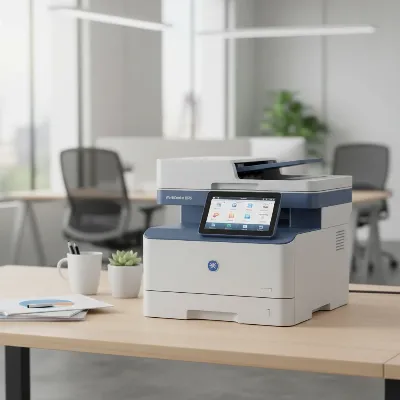 Xerox WorkCentre 6515 color laser multifunction printer in a modern office setting
User Interface and Connectivity
A significant highlight of the Xerox WorkCentre 6515 is its large, 5-inch color touchscreen interface. This tablet-style display is highly intuitive and user-friendly, making navigation through its extensive features remarkably simple. It reduces the need for fiddly buttons and allows quick access to functions like scanning to email, network, or cloud services such as iCloud and Google Drive. Connectivity options are comprehensive, including High-Speed USB 3.0, 10/100/1000 Base-T Ethernet, Wi-Fi 802.11n, and Wi-Fi Direct, ensuring flexible placement and easy integration into various network environments. Mobile printing is streamlined with support for the Xerox Print Service Plug-in for Android devices.
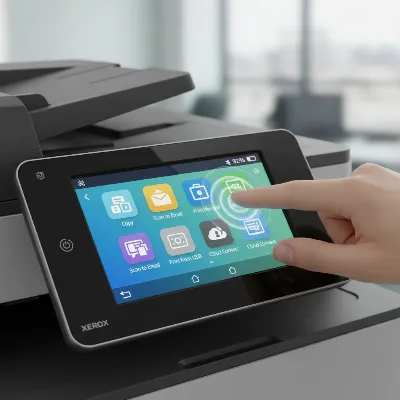 Close-up of the Xerox WorkCentre 6515's intuitive color touchscreen interface
Pros and Cons of the Xerox WorkCentre 6515
The Xerox WorkCentre 6515 has a strong reputation, yet a balanced view requires examining both its strengths and weaknesses. This multifunction device offers significant benefits for its target users, while also presenting some areas for consideration.
Advantages
The primary advantages of the WorkCentre 6515 include its easy-to-use touchscreen interface, which mimics smartphone navigation and makes accessing its myriad features straightforward. Its single-pass two-sided scanning capability is a major time-saver, preventing manual flipping of documents for duplex scanning. The printer delivers solid and vivid color output for graphics and presentations, along with excellent text quality that ensures professional-looking documents. It is feature-rich and well-specified for small to medium workgroups, offering extensive connectivity options (USB, Ethernet, Wi-Fi, Wi-Fi Direct) and robust security features, alongside cloud integration for scanning and printing.
Disadvantages
Despite its strengths, the WorkCentre 6515 has a few drawbacks. Some tests have noted that photos can suffer from color banding, particularly in areas of subtle shading, and text, while excellent, might appear a little on the grey side compared to the deepest blacks from some competitors. It’s not the absolute fastest printer in its class, though its speeds are still very competitive. The standard paper capacity (300 sheets) could be higher for some demanding offices without the optional second tray. Its physical size is also substantial, requiring adequate space, and it cannot handle A3 documents. Its running costs, specifically toner expenses, are not the cheapest in the market.
Running Costs and Value for Money
Evaluating the Xerox WorkCentre 6515’s running costs is essential for understanding its long-term value. The initial investment in the machine is one factor, but the ongoing expense of toner cartridges often determines the true cost of ownership over time.
The WorkCentre 6515 uses individual toner cartridges for black, cyan, magenta, and yellow. High-capacity toner cartridges are available, yielding approximately 5,000 ISO pages for black and up to 2,500 ISO pages for each color. While these yields are good, some reviews indicate that the cost per page can be around 11 pence (or equivalent in USD) for a combined black and color page. This places it in a moderate to slightly higher cost bracket compared to some competitors, particularly business inkjet models with supertank systems.
With a maximum monthly duty cycle of up to 50,000 pages, but a recommended average monthly print volume of up to 4,000 pages, the 6515 is clearly designed for consistent, moderate-volume use rather than extremely high-volume environments. Exceeding the recommended volume can lead to increased wear and tear and more frequent service calls. For its target audience of small to medium offices, the combination of its strong feature set, robust build, and above-average print quality still represents a solid value proposition, provided the ongoing toner costs are managed and considered within the overall budget.
Top-Rated Laser Printers Currently Available
The landscape of laser printers is constantly evolving, with new models offering enhanced features and efficiencies. While the Xerox WorkCentre 6515 has been a strong performer in its category, it’s important to recognize that it has been succeeded by newer iterations in Xerox’s lineup, most notably the Xerox C315 Color Multifunction Printer. This replacement continues the tradition of offering robust features for small to medium businesses.
Beyond Xerox, other brands offer compelling alternatives. For example, the HP Color LaserJet Pro MFP M479fdw is a popular choice known for its strong security features and reliable performance. The Brother MFC-L8900CDW is another highly-rated option, often praised for its fast print speeds and extensive connectivity. For those prioritizing ultra-low running costs, Epson’s WorkForce Pro ET-5880 EcoTank All-in-One Supertank Printer (an inkjet) offers a different technology but competes fiercely in the small office space due to its included ink supply.
The “top-rated” printer depends heavily on individual needs. For users who valued the WorkCentre 6515’s balance of print quality, comprehensive multifunctionality, and user-friendly interface, its successor, the Xerox C315, would
Frequently Asked Questions
What are the main functions of the Xerox WorkCentre 6515?
The Xerox WorkCentre 6515 is a multifunction printer (MFP) that integrates print, scan, copy, and fax capabilities into a single device. It is designed to handle diverse office tasks efficiently, making it a comprehensive solution for small to medium-sized businesses.
How fast does the Xerox WorkCentre 6515 print documents?
The Xerox WorkCentre 6515/DNI delivers print speeds of up to 28 pages per minute (ppm) for both color and black and white simplex prints on A4 paper. Duplex printing speeds are approximately 19 ppm for A4 documents, ensuring efficient handling of high-volume tasks.
What is the print resolution of the Xerox WorkCentre 6515?
The Xerox WorkCentre 6515 offers a print resolution of 1200 x 2400 dpi. This high resolution ensures excellent sharpness for text and graphics, producing crisp characters and vivid colors suitable for professional documents and presentations.
What connectivity options are available on the Xerox WorkCentre 6515?
The Xerox WorkCentre 6515/DNI provides comprehensive connectivity options including High-Speed USB 3.0, 10/100/1000 Base-T Ethernet, Wi-Fi 802.11n, and Wi-Fi Direct. These options allow for flexible placement and easy integration into various network environments, supporting mobile printing via Android devices.
What is the recommended monthly print volume for the Xerox WorkCentre 6515?
The recommended average monthly print volume for the Xerox WorkCentre 6515 is up to 4,000 pages, with a maximum monthly duty cycle of up to 50,000 pages. This makes it suitable for consistent, moderate-volume use in small to medium offices.
Get our weekly buyer guide
Practical specs, not advice. Unsubscribe anytime.
