Saving money on replacement toner cartridges is achievable through several DIY and alternative methods, potentially reducing costs by 50% to 80% per cartridge. Strategies include refilling cartridges at home, opting for compatible or remanufactured alternatives, resetting toner chips, and purchasing bulk toner powder. These approaches offer significant savings and environmental benefits, though they come with potential risks such as reduced print quality or printer damage.
The High Cost of Toner: Why It’s a Challenge for Consumers
Toner cartridges, the lifeblood of laser printers, are often surprisingly expensive. This high cost is largely due to the business model of printer manufacturers, who frequently sell printers at or near cost, then generate substantial profits from the sale of their proprietary “Original Equipment Manufacturer” (OEM) toner cartridges. These OEM cartridges are designed specifically for their printers, often incorporating sophisticated chips and technologies to ensure optimal performance and, critically, to track toner levels.
The manufacturers also frequently update these chips, making it harder for third-party cartridges to remain compatible. This creates a closed ecosystem where consumers are often pressured into buying expensive brand-name replacements. Understanding this dynamic is the first step toward breaking free from the cycle of costly toner purchases. For laser printer buying guides on this site.
DIY-Friendly Approaches to Reducing Toner Expenses
Navigating the world of printer toner doesn’t have to mean constantly emptying your wallet for OEM cartridges. Several accessible, DIY-friendly methods can significantly reduce your printing overhead, allowing you to get more pages for less.
Refilling Your Toner Cartridge at Home
Refilling your existing toner cartridge is perhaps the most direct way to save money. This method involves purchasing a toner refill kit, which typically includes toner powder, a pouring spout, and sometimes tools for creating a fill hole or cleaning. The cost savings can be substantial, often reducing the price per cartridge by 50% or more compared to buying a new OEM cartridge. While the process requires careful handling to avoid mess and ensure proper function, it empowers users to extend the life of their cartridges.
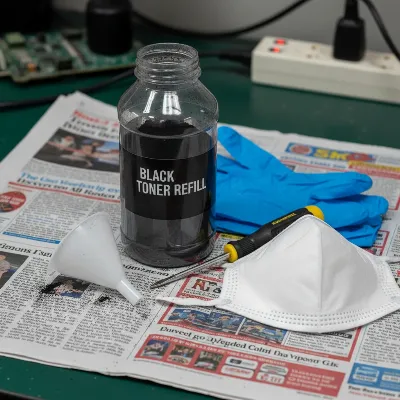 A DIY toner refill kit with gloves, mask, toner bottle, and tools on a messy workbench.
Opting for Compatible or Remanufactured Cartridges
If the thought of refilling seems too daunting or messy, compatible and remanufactured cartridges offer excellent alternatives. These are not DIY in the traditional sense, but they are crucial for saving money without the hands-on effort.
- Compatible Cartridges: These are brand-new cartridges produced by third-party manufacturers, designed to meet or exceed the specifications of OEM cartridges. They are typically much cheaper than original cartridges and can offer comparable print quality and page yield.
- Remanufactured Cartridges: These are original OEM cartridges that have been recycled. A third-party company collects used OEM cartridges, cleans them, replaces worn components (like the drum), refills them with new toner, and tests them for quality. They are an environmentally friendly choice and also significantly cheaper than new OEM cartridges.
Both compatible and remanufactured options can provide significant savings, often up to 70% off the price of an OEM cartridge. The key is to source them from reputable suppliers who offer guarantees and have positive customer reviews, ensuring you receive a quality product that won’t harm your printer.
Resetting Toner Cartridge Chips
|
Our Picks for the Best Laser Printer in 2026
As an Amazon Associate I earn from qualifying purchases.
|
||
| Num | Product | Action |
|---|---|---|
| 1 | HP Laserjet MFP M234dw Wireless Printer, Print, scan, Copy, Fast speeds, Easy Setup, Mobile Printing, Best-for-Small Teams, Instant Ink Eligible |

|
| 2 | Brother HL-L2405W Wireless Compact Monochrome Laser Printer with Mobile Printing, Black & White Output | Includes Refresh Subscription Trial(1), Works with Alexa |
|
| 3 | Brother HLL6210DW Business Monochrome Laser Printer with Large Paper Capacity, Wireless and Gigabit Ethernet Networking, Advanced Security Features and Mobile Printing (Renewed Premium) |
|
| 4 | Brother HLL3280CDW Wireless Compact Color Laser Printer, Duplex, Mobile Printing & Ethernet | Includes 2 Month Refresh Subscription Trial¹, Amazon Dash Replenishment Ready (Renewed Premium) |
|
| 5 | Brother MFC-L2820DW Wireless Compact Monochrome All-in-One Laser Printer with Copy, Scan and Fax, Duplex, Black & White | Includes Refresh Subscription Trial(1), Works with Alexa |
|
| 6 | Canon imageCLASS MF284dw Wireless Black & White Laser Printer – All-in-One for Home Use, Print/Copy/Scan, 2-Sided Printing, 35 PPM, Auto Doc Feeder, Mobile Device Compatible, Starter Toner Included |
|
| 7 | Brother DCP-L2640DW Wireless Compact Monochrome Multi-Function Laser Printer with Copy and Scan, Duplex, Mobile, Black & White | Includes Refresh Subscription Trial(1), Works with Alexa |
|
| 8 | Brother HL-L2460DW Wireless Compact Monochrome Laser Printer with Duplex, Mobile Printing, Black & White Output | Includes Refresh Subscription Trial(1), Works with Alexa |
|
| 9 | HP LaserJet MFP M235sdw All-in-One Laser Wireless Printer, Scan/Copy, Black & White, Duplex, Best-for-Office |
|
| 10 | Brother DCP-L2640DW Wireless Compact Monochrome Multi-Function Laser Printer with Copy and Scan, Duplex, Black & White Output | Includes Refresh Subscription Trial(1), (Renewed Premium) |
|
Modern toner cartridges often include a “smart chip” that communicates with your printer, tracking toner levels and sometimes preventing printing even when a small amount of toner remains. This mechanism is designed to prompt users to buy new cartridges sooner. A “chip resetter” is a small electronic device that can reset this chip, making the printer believe the cartridge is full again.
This tool is particularly useful if you’re refilling cartridges yourself or want to squeeze every last drop out of a low-toner cartridge. However, not all printer models are compatible with chip resetters, and some newer cartridges have more complex chips that are harder to bypass. It’s essential to research compatibility for your specific printer model before investing in a resetter. Some refillable cartridges are also designed with “auto-reset” chips, which automatically reset when reinserted into the printer.
Purchasing Bulk Toner Powder
For very high-volume users, buying toner powder in bulk can offer the absolute lowest cost per page. Instead of buying pre-packaged refill kits for individual cartridges, you purchase a larger quantity of toner powder. This method demands a higher degree of caution and technical understanding. Each printer model requires toner with specific particle size, electrostatic charge, and melting point to ensure proper adhesion and prevent damage to the fuser.
Handling bulk toner powder safely is paramount. It is a very fine particulate matter, and inhaling it can be a health hazard. Always wear gloves and a mask, and ensure you work in a well-ventilated area to minimize exposure. While the savings are substantial, the risks associated with improper handling, incompatible powder, or messy spills make this option best suited for experienced users willing to accept the inherent challenges.
Weighing the Benefits and Risks of DIY Toner Solutions
While the allure of cost savings is strong, it’s crucial to understand both the advantages and potential drawbacks of using DIY toner solutions and third-party cartridges. Making an informed decision means balancing your budget with performance expectations and potential risks.
Advantages
The primary benefit of embracing DIY toner solutions is the significant cost reduction. Refilling cartridges or opting for compatible/remanufactured alternatives can save you anywhere from 50% to 80% per cartridge compared to expensive OEM versions. For individuals or businesses with high printing volumes, these savings quickly add up, freeing up valuable funds.
Another compelling advantage is the environmental benefit, especially with refilling and remanufactured cartridges. By reusing existing cartridges, you reduce plastic waste going to landfills and lessen the environmental impact associated with manufacturing new cartridges. This aligns with sustainable practices, promoting a greener approach to printing.
Disadvantages
Despite the clear financial and environmental advantages, DIY toner solutions come with notable risks and disadvantages.
- Print Quality Degradation: This is one of the most common complaints. Refilled cartridges or lower-quality compatible/remanufactured options can lead to faded prints, streaking, smudges, or inconsistent colors. The toner powder in refill kits may not be of the same quality as original toner, and the internal components of a cartridge (like the drum) wear out over time, affecting print clarity.
- Potential for Printer Damage: Improper refilling, toner spills inside the printer, or using incompatible toner powder can cause serious damage to sensitive internal components like the fuser or drum unit. This can lead to expensive repairs or even render your printer inoperable, negating any initial cost savings.
- Voiding Your Printer Warranty: Many printer manufacturers explicitly state that using refilled or third-party cartridges can void your printer’s warranty. If your printer malfunctions while using non-OEM toner, you might lose access to free repairs or replacements.
- Mess and Complexity: Refilling toner at home can be a messy process. Toner powder is fine and can easily spill, staining surfaces and potentially getting into sensitive electronics. The process itself can be complex and time-consuming, requiring a certain level of dexterity and patience.
- Health Risks: Toner powder consists of fine plastic particles. Inhaling these particles without proper protection (like a mask) can cause respiratory irritation. Always wear gloves and a mask, and ensure you work in a well-ventilated area to minimize exposure.
- Inconsistent Results: The quality and lifespan of compatible or remanufactured cartridges can vary widely between brands and batches. Some may perform excellently, while others might fail prematurely or deliver poor print quality, leading to frustration and wasted resources.
- Shorter Cartridge Lifespan: Even if successfully refilled, a cartridge’s internal components (like the drum or wiper blade) are designed for a finite number of cycles. Refilling too many times can lead to mechanical failure or significantly degraded print quality before the toner is even fully depleted.
> “While the immediate savings of DIY toner solutions are appealing, it’s crucial for users to understand the potential trade-offs in print quality and the risk of printer damage. Always proceed with caution.” – Tech Expert, ReviewAToy.com
A Basic DIY Toner Refill Guide (Generic Example)
For those adventurous enough to tackle refilling their toner cartridges, here’s a general overview. However, it is critical to note that specific steps vary significantly by printer and cartridge model. Always refer to detailed, model-specific instructions from your refill kit supplier.
Necessary Tools and Safety Precautions:
- Toner refill kit: Includes toner powder, funnel/spout, and possibly a hole-making tool.
- Personal Protective Equipment (PPE):
- Disposable gloves: To prevent skin contact with toner.
- Face mask (N95 or higher): To prevent inhalation of fine toner particles.
- Safety glasses: To protect eyes from dust.
- Work area: A well-ventilated space, ideally outdoors or near an open window. Cover your work surface with newspaper or a disposable cloth to catch spills.
- Small screwdriver or drill (if no pre-made fill hole): For creating an access point.
- Small piece of electrical tape or strong adhesive: For sealing the hole.
- Toner vacuum (optional but recommended): A specialized vacuum designed for fine toner particles. Never use a regular household vacuum, as toner can damage the motor or become airborne.
General Steps for Refilling:
- Preparation and Safety: Put on all your PPE. Prepare your workspace by covering surfaces.
- Locate the Fill Hole: Some cartridges have a designated fill port, often sealed with a cap. If not, you may need to carefully drill a small hole in a specific spot (refer to your kit’s instructions). Be cautious to avoid damaging internal components.
- Empty Residual Toner (Optional but Recommended): Carefully shake out any remaining old toner into a waste bag. This prevents mixing incompatible toners.
- Refill with New Toner: Attach the funnel or spout to your toner powder bottle. Slowly and steadily pour the new toner powder into the cartridge through the fill hole. Avoid overfilling, as this can lead to leaks and poor print quality.
- Seal the Hole: Once filled, securely seal the hole. If you drilled one, use a piece of strong electrical tape or a specialized plug provided in your kit. Ensure a tight seal to prevent leaks.
- Clean the Cartridge: Carefully wipe down the exterior of the cartridge to remove any spilled toner powder.
- Reset the Chip (if applicable): If your cartridge has a chip that needs resetting, use a chip resetter tool as per its instructions.
- Install and Test: Reinstall the refilled cartridge into your printer. Print a test page to check the quality.
Strong Disclaimers: Refilling is not without its challenges. Each cartridge design is unique, and what works for one may not work for another. Be prepared for potential messes, quality inconsistencies, and the risk of damaging the cartridge or printer. Proceed with extreme caution and only if you are comfortable with these risks.
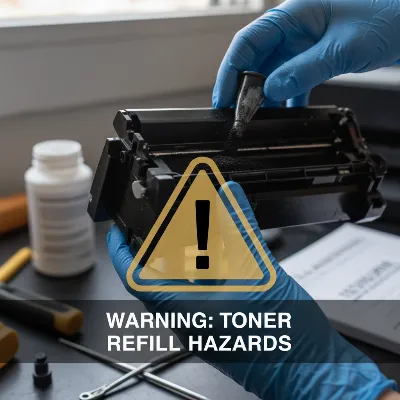 Hands wearing gloves holding a refilled toner cartridge with a warning symbol overlay.
Beyond Refills: Smart Habits to Extend Toner Life
Beyond refilling or buying alternative cartridges, adopting smarter printing habits can also significantly extend the life of your toner, delaying the need for replacements altogether. These simple changes can cumulatively lead to substantial savings over time.
- Print in Draft Mode: For internal documents, rough drafts, or anything that doesn’t require pristine quality, switch your printer settings to “draft” or “economy” mode. This uses less toner per page, often by reducing print density or using fewer dots per inch, without making the text unreadable for most purposes.
- Use Economy Fonts and Smaller Sizes: Not all fonts consume the same amount of toner. Lighter fonts like Century Gothic or Ecofont (specifically designed to save ink/toner by having tiny holes) use less than heavier fonts like Times New Roman or Arial. Reducing font size from 12 to 10 points can make a noticeable difference in toner consumption while remaining perfectly legible.
- Shake Low Cartridges: When your printer warns you that toner is low, don’t immediately replace the cartridge. Often, there’s still a significant amount of toner powder clinging to the inside walls. Carefully remove the cartridge from the printer, gently shake it side-to-side (not up and down) to redistribute the toner, then reinsert it. This can often yield hundreds more usable pages.
- Double-Check Before Printing: Avoid wasteful reprints by always previewing documents before you send them to the printer. Catching errors in formatting, typos, or unnecessary pages beforehand saves both toner and paper.
- Optimize Printer Settings for Specific Jobs: Utilize your printer’s settings to match the output to the need. For example, if you’re printing photos, use high-quality settings. For text documents, lower resolution settings are usually sufficient and save toner.
- Store Cartridges Properly: Store spare toner cartridges in their original, unopened packaging in a cool, dry, dark place. Exposure to high temperatures, humidity, or direct sunlight can degrade the toner powder, shortening its shelf life and affecting print quality.
By integrating these practical tips into your daily printing routine, you can maximize the output from each toner cartridge, stretching your investment further and contributing to both your financial savings and a more sustainable printing environment.
Conclusion
The pursuit of more affordable printing doesn’t have to be an uphill battle against expensive OEM toner cartridges. By exploring DIY methods like refilling your own cartridges, intelligently choosing compatible or remanufactured alternatives, and even understanding how to reset toner chips, you gain significant control over your printing budget. While these solutions offer substantial cost savings and environmental benefits, it’s vital to proceed with a clear understanding of the potential risks, including variable print quality, printer damage, and voided warranties.
The best approach depends on your specific needs, comfort level with DIY tasks, and the importance of consistent, high-quality output. Balancing the desire for savings with meticulous research and adherence to safety guidelines will empower you to make informed decisions. By adopting smart printing habits in conjunction with these cost-saving strategies, you can enjoy efficient and economical printing for years to come. What step will you take first to liberate your printing budget?
Frequently Asked Questions
Is refilling toner safe for my printer?
Refilling toner can pose risks to your printer, including potential damage from toner spills, incompatible powder, or worn cartridge components. Many printer manufacturers also state that using refilled cartridges can void your warranty. It’s crucial to follow instructions meticulously and be aware of these risks.
How many times can a toner cartridge be refilled?
Generally, a toner cartridge can be refilled 1 to 3 times effectively. After a few refills, internal components like the drum unit and wiper blade wear out, which can lead to a noticeable decline in print quality, such as streaks or faded output.
What are the health risks associated with toner powder?
Toner powder consists of very fine particles that, if inhaled, can cause respiratory irritation. Prolonged exposure without proper ventilation and a mask is not recommended. It can also irritate skin and eyes upon contact. Always wear gloves, a mask, and work in a well-ventilated area when handling toner powder.
Will using non-OEM toner void my printer warranty?
Many printer manufacturers include clauses in their warranty that state using non-OEM (Original Equipment Manufacturer) toner, including refilled, compatible, or remanufactured cartridges, may void your warranty if a printer issue is directly attributed to the use of such products. It’s advisable to check your printer’s warranty terms.
Frequently Asked Questions
Is refilling toner safe for my printer's long-term health?
Refilling toner can pose risks to your printer, including potential damage from toner spills, incompatible powder, or worn cartridge components. Many printer manufacturers also state that using refilled cartridges can void your warranty, so it's crucial to follow instructions meticulously and be aware of these risks.
How many times can a typical toner cartridge be refilled effectively?
Generally, a toner cartridge can be refilled 1 to 3 times effectively. After a few refills, internal components like the drum unit and wiper blade wear out, which can lead to a noticeable decline in print quality, such as streaks or faded output.
What are the health risks associated with handling toner powder?
Toner powder consists of very fine particles that, if inhaled, can cause respiratory irritation. Prolonged exposure without proper ventilation and a mask is not recommended. It can also irritate skin and eyes upon contact, so always wear gloves, a mask, and work in a well-ventilated area when handling toner powder.
Will using non-OEM toner void my printer's warranty?
Many printer manufacturers include clauses in their warranty that state using non-OEM (Original Equipment Manufacturer) toner, including refilled, compatible, or remanufactured cartridges, may void your warranty if a printer issue is directly attributed to the use of such products. It's advisable to check your specific printer's warranty terms.
What are compatible toner cartridges and how do they save money?
Compatible toner cartridges are brand-new cartridges produced by third-party manufacturers, designed to meet or exceed OEM specifications. They are typically much cheaper than original cartridges, often offering savings of up to 70%, while providing comparable print quality and page yield.
How to Refill a Toner Cartridge
Refilling your toner cartridge at home can save significant money, but requires careful handling and adherence to safety precautions. This guide provides general steps, but always consult model-specific instructions.
Put on disposable gloves, a face mask (N95 or higher), and safety glasses. Prepare your workspace by covering surfaces with newspaper or a disposable cloth in a well-ventilated area to catch spills.
Identify the designated fill port on your cartridge, often sealed with a cap. If no port exists, carefully drill a small hole in the specified location according to your refill kit's instructions, avoiding internal components.
Attach the funnel or spout to your toner powder bottle. Slowly and steadily pour the new toner powder into the cartridge through the fill hole. Avoid overfilling to prevent leaks and ensure optimal print quality.
Once filled, securely seal the hole using electrical tape or a specialized plug from your kit, ensuring a tight seal. Carefully wipe down the exterior of the cartridge to remove any spilled toner powder.
If your cartridge has a chip that needs resetting, use a chip resetter tool as per its instructions. Reinstall the refilled cartridge into your printer and print a test page to check the quality and functionality.
Get our weekly buyer guide
Practical specs, not advice. Unsubscribe anytime.
