The HP LaserJet Pro MFP M283fdw Color Printer is a highly competent and reliable multifunction device, ideal for small offices and home users prioritizing efficiency and professional output. It delivers rapid, sharp text and vibrant color graphics at speeds of approximately 22 pages per minute for both color and monochrome. This model includes automatic duplex printing, an automatic document feeder (ADF), and seamless wireless connectivity, making it a versatile workhorse for diverse printing needs.
What is a Laser Printer? (Definition and Operating Principle)
At its core, a laser printer is an electrophotographic device that uses a laser beam to produce high-quality text and graphics on paper. Unlike inkjet printers, which spray liquid ink through tiny nozzles, laser printers employ a dry powder called toner and a sophisticated process involving static electricity, heat, and a photosensitive drum. The laser “draws” an image onto the drum, which then attracts toner particles. This toner is subsequently transferred to the paper and fused into place using heat and pressure, resulting in durable, sharp prints. This fundamental difference in technology gives laser printers distinct advantages, particularly in speed and precision for text documents.
Advantages and Disadvantages of Laser Printers
Laser printers have carved out a significant niche in the printing world due to their unique benefits, though they also come with certain trade-offs. Understanding these can help users determine if a laser printer, and specifically the HP LaserJet Pro MFP M283fdw, is the right fit for their requirements. For explore our laser printer reviews on this site.
Advantages
Laser printers are renowned for their fast printing speeds, making them ideal for high-volume environments where efficiency is key. They deliver sharp, crisp print quality with high resolution, especially noticeable in text and fine lines, making documents look professional. While the initial cost of toner cartridges can seem high, the cost per page is often significantly lower than inkjet printers, particularly for black and white printing, due to higher page yields. Laser printers are generally more durable and reliable with fewer moving parts susceptible to drying out or clogging, leading to less frequent maintenance and a longer lifespan.
Disadvantages
Despite their strengths, laser printers do have some drawbacks. The initial purchase price is typically higher than comparable inkjet models, which can be a barrier for budget-conscious users. Their internal components, including the fuser and toner cartridges, often result in a larger physical footprint, requiring more desk space. While generally safe, some older models or printers operating in poorly ventilated areas can emit trace amounts of ozone during the printing process. Lastly, when repairs are needed, especially for complex issues involving internal mechanisms or laser components, the repair costs can be substantial.
Popular Laser Printer Types on the Market
The market for laser printers offers a variety of configurations to suit different user needs, from basic personal devices to advanced multifunction machines. The HP LaserJet Pro MFP M283fdw, as we will see, fits squarely into the latter, offering a comprehensive suite of features.
Monochrome (Black and White) Laser Printers
|
Our Picks for the Best Laser Printer in 2026
As an Amazon Associate I earn from qualifying purchases.
|
||
| Num | Product | Action |
|---|---|---|
| 1 | Brother HLL6210DW Business Monochrome Laser Printer with Large Paper Capacity, Wireless and Gigabit Ethernet Networking, Advanced Security Features and Mobile Printing (Renewed Premium) |

|
| 2 | Brother HL-L2405W Wireless Compact Monochrome Laser Printer with Mobile Printing, Black & White Output | Includes Refresh Subscription Trial(1), Works with Alexa |
|
| 3 | Brother DCP-L2640DW Wireless Compact Monochrome Multi-Function Laser Printer with Copy and Scan, Duplex, Mobile, Black & White | Includes Refresh Subscription Trial(1), Works with Alexa |
|
| 4 | Brother HL-L2460DW Wireless Compact Monochrome Laser Printer with Duplex, Mobile Printing, Black & White Output | Includes Refresh Subscription Trial(1), Works with Alexa |
|
| 5 | HP LaserJet MFP M235sdw All-in-One Laser Wireless Printer, Scan/Copy, Black & White, Duplex, Best-for-Office |
|
| 6 | Brother HLL3280CDW Wireless Compact Color Laser Printer, Duplex, Mobile Printing & Ethernet | Includes 2 Month Refresh Subscription Trial¹, Amazon Dash Replenishment Ready (Renewed Premium) |
|
| 7 | HP Laserjet MFP M234dw Wireless Printer, Print, scan, Copy, Fast speeds, Easy Setup, Mobile Printing, Best-for-Small Teams, Instant Ink Eligible |
|
| 8 | Brother DCP-L2640DW Wireless Compact Monochrome Multi-Function Laser Printer with Copy and Scan, Duplex, Black & White Output | Includes Refresh Subscription Trial(1), (Renewed Premium) |
|
| 9 | Canon imageCLASS MF284dw Wireless Black & White Laser Printer – All-in-One for Home Use, Print/Copy/Scan, 2-Sided Printing, 35 PPM, Auto Doc Feeder, Mobile Device Compatible, Starter Toner Included |
|
| 10 | Brother MFC-L2820DW Wireless Compact Monochrome All-in-One Laser Printer with Copy, Scan and Fax, Duplex, Black & White | Includes Refresh Subscription Trial(1), Works with Alexa |
|
Monochrome laser printers are specifically designed for printing text and documents in black and white. They are the go-to choice for offices or individuals with high-volume text printing needs, such as invoices, reports, or contracts. These printers excel in speed and deliver exceptionally crisp text, often at a very low cost per page for toner. Their simplicity generally translates to lower purchase prices and less complex maintenance compared to their color counterparts.
Color Laser Printers
Color laser printers, like the HP LaserJet Pro MFP M283fdw, expand printing capabilities to include vibrant graphics and images alongside crisp text. They utilize four separate toner cartridges (Cyan, Magenta, Yellow, and Black) to produce full-color output. While they offer excellent color vibrancy for business graphics and presentations, their photo printing quality, though good, generally doesn’t match the nuanced detail and color accuracy of dedicated photo inkjet printers for professional photography applications. The cost per page is higher than monochrome laser printers due to the multiple toners.
All-in-One (Multifunction) Laser Printers
All-in-One, or Multifunction Printers (MFPs), combine printing with other essential office functions such as scanning, copying, and often faxing. The HP M283fdw is a prime example of a color laser MFP. These devices are incredibly convenient for small offices, home offices, and even families, as they consolidate multiple machines into one unit, saving space and reducing clutter. They offer integrated solutions for document management, making them versatile tools for a wide range of tasks beyond just printing.
Comparison: HP LaserJet Pro MFP M283fdw in Focus
When considering an investment in a new printer, especially a color laser MFP, it’s crucial to understand how a specific model like the HP LaserJet Pro MFP M283fdw stacks up against its class. While a direct, extensive comparison table with numerous models might be beyond the scope of a single product review, we can examine its competitive edge and typical performance metrics. The M283fdw generally targets small and home office users who need a balance of speed, color quality for documents, and comprehensive multifunctionality.
It typically offers print speeds of around 22 pages per minute (ppm) for both black and color documents, which is competitive for its segment. Its print resolution for text is exceptionally sharp, consistently praised by users and reviewers. The device usually features a 2.7-inch color touchscreen, automatic document feeder (ADF), and automatic duplex printing, which are key differentiators from entry-level models. Compared to similar-priced inkjet MFPs, the M283fdw provides superior text quality and faster speeds for document printing. However, for users prioritizing photographic output, high-end inkjet models might still offer better detail and color accuracy in images, although at a higher cost per page and often slower speeds for plain documents.
Factors to Consider When Buying a Laser Printer
Selecting the right laser printer involves weighing several critical factors to ensure it aligns perfectly with your specific needs and budget.
Usage Needs
First, assess what you primarily need to print. Are you mainly printing black and white text documents for reports and invoices? Or do you require vibrant color graphics for presentations and marketing materials? Consider your printing frequency; a high-volume office will need a more robust machine than a casual home user. Also, determine if you need additional functionalities like scanning, copying, or faxing. The HP M283fdw, as an MFP, is an excellent choice if you need all four functions.
Budget
Your budget should account for both the initial purchase price of the printer and the ongoing running costs. While laser printers generally have a higher upfront cost, their toner cartridges often provide a lower cost per page in the long run. Factor in the price of replacement toner cartridges (both black and color) and their estimated page yields. It’s often wiser to invest slightly more upfront for a printer with lower long-term consumables costs.
Features
Modern laser printers come packed with various features that can significantly enhance productivity. Print speed (pages per minute) is crucial for high-volume users. Print resolution (dots per inch, dpi) impacts the sharpness and detail of your output. Connectivity options like Wi-Fi, Ethernet, and USB are standard, with Wi-Fi being essential for wireless printing from multiple devices. Automatic duplex printing (two-sided printing) saves paper, and an Automatic Document Feeder (ADF) is invaluable for scanning or copying multi-page documents without manual intervention. Paper capacity and support for different paper sizes and types are also important considerations.
Brand and Reliability
Choosing a reputable brand like HP ensures access to a wide range of support, drivers, and readily available consumables. Research user reviews and expert opinions on specific models for their reliability and durability. A good warranty policy and readily available customer service can save significant headaches down the line. Brands with a strong history in printing technology often provide more consistent performance and longer-lasting devices.
Top-Rated: A Deep Dive into the HP LaserJet Pro MFP M283fdw Color Printer
The HP LaserJet Pro MFP M283fdw Color Printer consistently receives high marks for its performance and feature set, making it a top choice for small to medium-sized offices and demanding home users. It’s designed to deliver professional-quality output efficiently.
This model excels in producing incredibly sharp and crisp black text documents and vibrant, professional-looking color graphics for presentations and business reports. Its laser technology ensures prints are smudge-free and resistant to fading. Users frequently praise its fast printing speeds, typically around 22 pages per minute for both color and monochrome, which significantly boosts office efficiency. The printer’s automatic duplex printing feature is a standout, allowing for automatic two-sided printing, conserving paper and reducing environmental impact.
“The HP M283fdw stands out with its exceptional print quality, wireless connectivity options, and convenient mobile printing capabilities. Real users have praised its performance, stating that it delivers crisp and vibrant prints consistently.” – IoT Solutions Review, March 2024
Connectivity is robust, offering Wi-Fi, Ethernet, and USB options, allowing for flexible placement and easy network integration. The HP Smart mobile app enhances usability, enabling printing directly from smartphones and tablets, as well as cloud integration. The 2.7-inch color touchscreen provides an intuitive interface for managing print, scan, copy, and fax functions effortlessly.
The multifunctionality of the M283fdw is a major draw. Its automatic document feeder (ADF) is highly rated for quickly processing multi-page documents for scanning or copying, saving considerable time. The scanner produces clear digital copies with a resolution up to 1200×1200 dpi, though some expert reviews suggest it may struggle with capturing very fine details for graphics and photos, a common characteristic for many laser MFPs compared to dedicated photo scanners.
While its toner cartridges are initially expensive, they boast high page yields, resulting in a low cost per print over time, a significant advantage for those with consistent printing needs. However, for photo printing, like most laser printers, the M283fdw performs adequately for general business use but may produce images that appear slightly muted or oversaturated compared to high-end inkjet photo printers, particularly with blue hues. Its physical size is also a consideration; it’s a relatively large device, reflecting its robust multifunction capabilities. 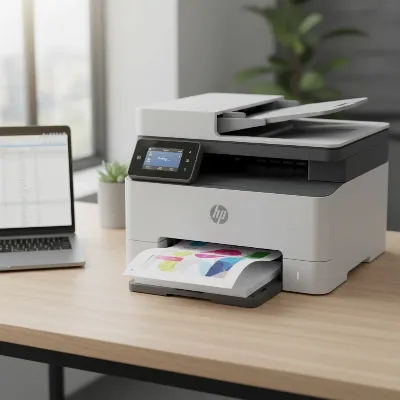 HP LaserJet Pro MFP M283fdw Color Printer in a modern home office setting, printing documents.
Overall, the HP LaserJet Pro MFP M283fdw is an excellent choice for small and home offices that demand quick, high-quality document printing, reliable multifunctionality, and wireless convenience. Its blend of speed, print quality, and comprehensive features positions it as a highly capable and efficient workhorse in its category.
Conclusion
The HP LaserJet Pro MFP M283fdw Color Printer stands out as a highly competent and reliable multifunction device for any small office or home user prioritizing efficiency and professional output. Its core strengths lie in delivering rapid, sharp text and vibrant color graphics, coupled with a full suite of features including automatic duplex printing, an ADF, and seamless wireless connectivity. While the initial investment might be higher than some inkjet alternatives, its lower cost per page for toner and robust build quality offer substantial long-term value. This laser printer is a powerful tool designed to streamline document handling and boost productivity for a variety of tasks.
Are you ready to improve your printing experience with the proven performance of a color laser MFP?
Frequently Asked Questions
Is the HP LaserJet Pro MFP M283fdw good for photo printing?
While the HP M283fdw can print color images, it is not ideal for high-quality photo printing. Like most laser printers, it excels at sharp text and business graphics, but photos may appear slightly oversaturated or muted compared to dedicated inkjet photo printers.
What are the main connectivity options for the HP M283fdw?
The HP LaserJet Pro MFP M283fdw offers versatile connectivity options, including Wi-Fi for wireless printing from various devices, Ethernet for reliable network connection, and a traditional USB port for direct computer hookup. It also supports mobile printing via the HP Smart app.
Does the HP M283fdw have automatic two-sided printing?
Yes, the HP LaserJet Pro MFP M283fdw features automatic duplex printing. This function allows the printer to automatically print on both sides of a page without manual intervention, saving paper and making it more efficient for producing professional double-sided documents.
How does the cost per page compare to inkjet printers?
Typically, the HP M283fdw, as a laser printer, offers a lower cost per page than most inkjet printers, especially for black and white documents. Although toner cartridges have a higher upfront cost, their significantly higher page yields make them more economical in the long run for frequent printing.
Is the HP LaserJet Pro MFP M283fdw suitable for a small business?
Absolutely. The HP M283fdw is an excellent choice for small businesses and home offices due to its fast print speeds, high-quality output for documents, comprehensive multifunction capabilities (print, scan, copy, fax), and robust connectivity options. It’s designed for efficiency and reliability in a busy work environment.
Frequently Asked Questions
Is the HP LaserJet Pro MFP M283fdw good for photo printing?
While the HP M283fdw can print color images, it is not ideal for high-quality photo printing. Like most laser printers, it excels at sharp text and business graphics, but photos may appear slightly oversaturated or muted compared to dedicated inkjet photo printers.
What are the main connectivity options for the HP M283fdw?
The HP LaserJet Pro MFP M283fdw offers versatile connectivity options, including Wi-Fi for wireless printing from various devices, Ethernet for reliable network connection, and a traditional USB port for direct computer hookup. It also supports mobile printing via the HP Smart app.
Does the HP M283fdw have automatic two-sided printing?
Yes, the HP LaserJet Pro MFP M283fdw features automatic duplex printing. This function allows the printer to automatically print on both sides of a page without manual intervention, saving paper and making it more efficient for producing professional double-sided documents.
How does the cost per page compare to inkjet printers?
Typically, the HP M283fdw, as a laser printer, offers a lower cost per page than most inkjet printers, especially for black and white documents. Although toner cartridges have a higher upfront cost, their significantly higher page yields make them more economical in the long run for frequent printing.
Is the HP LaserJet Pro MFP M283fdw suitable for a small business?
Absolutely. The HP M283fdw is an excellent choice for small businesses and home offices due to its fast print speeds, high-quality output for documents, comprehensive multifunction capabilities (print, scan, copy, fax), and robust connectivity options. It's designed for efficiency and reliability in a busy work environment.
Get our weekly buyer guide
Practical specs, not advice. Unsubscribe anytime.

Coming from an inkjet, the difference with this laser printer is night and day. The toner lasts so much longer, and the prints are consistently crisp, even on detailed graphics. I appreciate the robust build quality and the fact that it handles heavy printing loads without a hitch. It’s exactly what I needed for professional output.
The HP LaserJet Pro MFP M283fdw does a good job with text and graphics, and the 22 pages per minute speed is accurate. However, I found the automatic document feeder to be a little finicky with mixed paper sizes. It sometimes jams if the papers aren’t perfectly aligned, which can be a bit frustrating when scanning multiple documents. Otherwise, it’s a decent printer.
I’ve been using the HP LaserJet Pro MFP M283fdw for a few months now for my home office, and it’s been fantastic. The print speed is really impressive, especially for color documents. I love not having to wait around for large reports to print, and the quality is always super sharp. Definitely a solid investment for anyone needing a reliable multifunction printer.
This printer is a workhorse! The automatic duplex printing feature has saved me so much time and paper, which is a big plus for my small business. Setup was pretty straightforward, and the wireless connectivity has been flawless. My only minor gripe is that the toner can be a bit pricey, but the print quality makes up for it.