The best wireless laser printers for Mac and iOS in 2026 offer unparalleled performance, compatibility, and value for Apple users, with top models including the HP LaserJet Pro MFP 4101fdw for monochrome office use and the Canon MF656Cdw for versatile color printing. These printers integrate seamlessly into the Apple ecosystem, providing efficient, high-quality output for various needs, from professional documents to detailed graphics, ensuring a smooth digital workflow.
What is a Laser Printer? (Definition and Operating Principle)
At its core, a laser printer is a sophisticated piece of technology that revolutionized document production. Unlike inkjet printers, which spray liquid ink, laser printers utilize an electrostatic digital printing process to produce high-quality text and graphics with remarkable speed and precision. The concept was pioneered by Gary Starkweather at Xerox in 1969, marking a significant leap in printing technology.
The process begins when a laser beam projects an image of the desired print onto a rotating, negatively charged cylinder known as a “drum.” This laser selectively alters the electrical charge on the drum’s surface, creating a latent image. Electrically charged powdered ink, called toner, is then attracted to these areas of differential charge on the drum. As a sheet of paper passes by, it receives a stronger electrostatic charge, pulling the toner from the drum onto the page. Finally, the paper, now bearing the toner image, travels through a fuser unit. Here, intense heat and pressure permanently melt and bond the toner particles onto the paper fibers, resulting in a crisp, dry, and durable print. This intricate dance of electricity, light, and heat is what makes laser printing so effective for sharp textual output and efficient high-volume tasks.
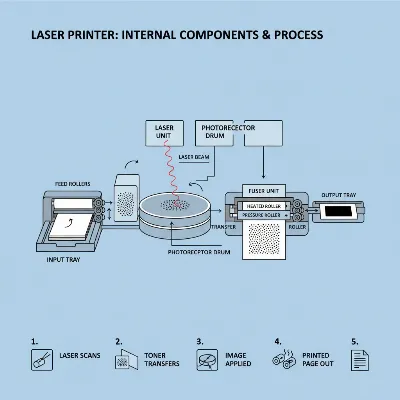 Diagram illustrating the internal workings of a laser printer for clear understanding of its process
Advantages and Disadvantages of Laser Printers
Choosing a printer involves weighing various factors, and laser printers come with a distinct set of pros and cons that differentiate them from their inkjet counterparts. Understanding these can help you determine if a laser printer is the right fit for your specific needs, particularly within an Apple-centric environment.
Advantages
Laser printers are celebrated for several key benefits, making them a preferred choice for many users, especially those with high print volumes. Their speed and efficiency are often unmatched, allowing them to churn out hundreds of pages in a short amount of time, which is invaluable for busy offices and demanding home environments. You’ll find that for text-heavy documents, laser printers deliver crisp, sharp text with clean lines and clear fonts, providing a professional finish that is critical for reports, contracts, and academic papers.
Despite a higher initial investment, laser printers often boast lower long-term costs per page because their toner cartridges yield significantly more prints than liquid ink cartridges, and the powdered toner does not dry out over time. This makes them highly cost-effective for frequent printing. Laser printers are known for their durability and longevity, built with robust components that ensure reliable performance and less frequent maintenance over their lifespan.
Disadvantages
|
Our Picks for the Best Laser Printer in 2026
As an Amazon Associate I earn from qualifying purchases.
|
||
| Num | Product | Action |
|---|---|---|
| 1 | HP Laserjet MFP M234dw Wireless Printer, Print, scan, Copy, Fast speeds, Easy Setup, Mobile Printing, Best-for-Small Teams, Instant Ink Eligible |

|
| 2 | Brother HLL6210DW Business Monochrome Laser Printer with Large Paper Capacity, Wireless and Gigabit Ethernet Networking, Advanced Security Features and Mobile Printing (Renewed Premium) |
|
| 3 | Brother HL-L2460DW Wireless Compact Monochrome Laser Printer with Duplex, Mobile Printing, Black & White Output | Includes Refresh Subscription Trial(1), Works with Alexa |
|
| 4 | Brother DCP-L2640DW Wireless Compact Monochrome Multi-Function Laser Printer with Copy and Scan, Duplex, Mobile, Black & White | Includes Refresh Subscription Trial(1), Works with Alexa |
|
| 5 | Brother MFC-L2820DW Wireless Compact Monochrome All-in-One Laser Printer with Copy, Scan and Fax, Duplex, Black & White | Includes Refresh Subscription Trial(1), Works with Alexa |
|
| 6 | Brother DCP-L2640DW Wireless Compact Monochrome Multi-Function Laser Printer with Copy and Scan, Duplex, Black & White Output | Includes Refresh Subscription Trial(1), (Renewed Premium) |
|
| 7 | HP LaserJet MFP M235sdw All-in-One Laser Wireless Printer, Scan/Copy, Black & White, Duplex, Best-for-Office |
|
| 8 | Brother HLL3280CDW Wireless Compact Color Laser Printer, Duplex, Mobile Printing & Ethernet | Includes 2 Month Refresh Subscription Trial¹, Amazon Dash Replenishment Ready (Renewed Premium) |
|
| 9 | Canon imageCLASS MF284dw Wireless Black & White Laser Printer – All-in-One for Home Use, Print/Copy/Scan, 2-Sided Printing, 35 PPM, Auto Doc Feeder, Mobile Device Compatible, Starter Toner Included |
|
| 10 | Brother HL-L2405W Wireless Compact Monochrome Laser Printer with Mobile Printing, Black & White Output | Includes Refresh Subscription Trial(1), Works with Alexa |
|
However, laser printers are not without their drawbacks. The most immediate consideration for many is the higher initial purchase price compared to most inkjet models. This upfront cost can be a barrier for budget-conscious individuals or those with very infrequent printing needs. Another common disadvantage is their size and footprint; laser printers tend to be larger and heavier, requiring more desk space, which can be problematic in compact home offices.
While advancements have been made, laser printers can still be less ideal for high-quality photo printing when compared to dedicated inkjet photo printers. While they can produce color graphics, the vibrant hues and smooth gradients achievable with dye- or pigment-based inkjet inks are typically superior for photographic reproductions. Lastly, some older or less efficient models may emit small amounts of ozone during operation, though modern designs often mitigate this concern.
Popular Types of Laser Printers on the Market
The versatility of laser printing technology has led to the development of several types of printers, each catering to different user requirements. When selecting a wireless laser printer for your Mac and iOS devices, understanding these categories is crucial.
Monochrome Laser Printers (Black and White)
Monochrome laser printers are the workhorses of document printing. Designed exclusively for black and white output, these machines excel at producing sharp text and basic graphics at high speeds. They are the most cost-effective option for users whose primary need is to print large volumes of textual documents, such as contracts, reports, or school assignments. With lower toner costs per page and faster print speeds for black and white pages, they represent an economical and efficient choice for dedicated document printing.
Color Laser Printers
For those who need to incorporate color into their documents—be it for presentations, marketing materials, or detailed charts—color laser printers offer a robust solution. These printers use four toner cartridges (black, cyan, magenta, and yellow) to produce a full spectrum of colors. While the initial cost and the expense of color toner cartridges are higher than those for monochrome models, color laser printers deliver professional-looking color documents that are crisp and consistent, making them suitable for business and professional environments where color communication is important.
Multifunction Laser Printers (All-in-One)
Multifunction printers (MFPs), often referred to as “all-in-one” devices, combine printing with other essential office functions: scanning, copying, and often faxing. These integrated devices are incredibly space-saving and convenient, consolidating several machines into one unit. For home offices and small businesses, an all-in-one laser printer can streamline workflows, allowing users to print documents, scan receipts to their Mac, copy important papers, and even send faxes directly from a single device. Many modern MFPs also offer advanced features like automatic document feeders (ADF) for multi-page scanning and automatic duplex printing.
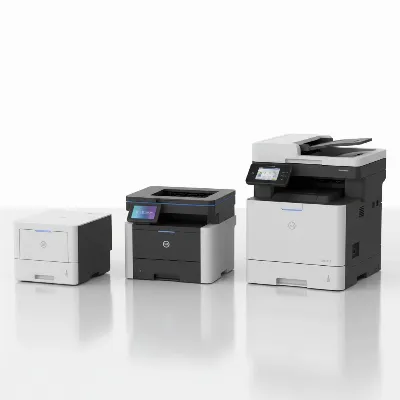 Visual comparison of different types of laser printers: monochrome, color, and all-in-one models
Comparison Table: Top Wireless Laser Printers for Mac and iOS in 2026
To help you make an informed decision, here’s a detailed comparison of some of the best wireless laser printers that are highly compatible with Mac and iOS devices in 2026. This table highlights key specifications and features to consider for your Apple ecosystem.
| Feature / Model | HP LaserJet Pro MFP 4101fdw | Canon MF656Cdw | HP Color LaserJet Pro MFP 3301fdw | Brother MFC-L8905CDW | HP LaserJet M209dw | Brother HL-L2405W |
|---|---|---|---|---|---|---|
| Type | Monochrome MFP | Color MFP | Color MFP | Color MFP | Monochrome Print | Monochrome Print |
| Print Speed (ppm) | 42 | Fast | 26 (Color/B&W) | 32-33 (Color/B&W) | 30 | 30 |
| AirPrint Support | Yes | Yes | Yes | Yes | Yes | Yes |
| Connectivity | Wi-Fi, Ethernet, USB | Wi-Fi, Ethernet, USB | Wi-Fi, Ethernet, USB | Wi-Fi, Ethernet, USB | Wi-Fi, USB | Wi-Fi |
| Duplex Printing | Auto | Auto | Auto | Auto | Auto | Auto |
| Ideal For | Office, high-volume B&W | All-in-one color office | Small teams, wireless color | Demanding workgroups, Mac users | Home/small office, compact | Budget B&W home |
| Noted for | Security, speed | Color output, features | Wireless reliability | Sharp docs, low CPT | Compact, efficient | Simple, reliable |
Note: “Fast” indicates high-speed performance typical for laser printers, with specific ppm varying slightly by task and document complexity.
Factors to Consider When Buying a Laser Printer (Buying Guide)
Selecting the ideal wireless laser printer for your Mac and iOS devices goes beyond just looking at the price tag. A thoughtful evaluation of your specific requirements will ensure you invest in a machine that truly meets your needs and integrates seamlessly into your digital life.
Usage Needs
Before anything else, define your primary printing requirements. What type of documents will you print most often? If it’s mainly text-heavy reports, a monochrome laser printer will be efficient and cost-effective. However, if your work involves presentations, charts, or marketing materials with color graphics, a color laser printer is a must. Consider your printing frequency and volume – occasional use might not justify a high-end model, but high-volume printing benefits immensely from the speed and low cost per page of a robust laser printer. Lastly, assess if you need additional functionalities like scanning, copying, or faxing. An all-in-one (MFP) can save space and money if these are regular tasks.
Budget
Your budget should encompass more than just the initial purchase price. While laser printers often have a higher upfront cost, it’s crucial to consider the total cost of ownership. Research the cost of replacement toner cartridges and their yield to calculate the cost per page (CPP). This figure can reveal significant long-term savings for laser printers compared to inkjets, especially for high-volume users. Also, be aware of any drum unit replacement frequency and cost, as some models require this separate component to be changed periodically.
Features
Modern laser printers come packed with features designed to enhance productivity and user experience. Print speed (ppm) is vital for efficiency, especially in busy environments. Resolution (dpi) impacts the sharpness of text and detail in graphics, with higher DPI generally yielding better quality. For Apple users, AirPrint support is non-negotiable for driver-free printing from iPhone, iPad, and Mac. Look for robust wireless connectivity options (Wi-Fi, dual-band Wi-Fi, Wi-Fi Direct) and potentially Ethernet for wired network stability. Automatic duplex printing (two-sided printing) can significantly save paper. Consider paper capacity of the input tray and whether an Automatic Document Feeder (ADF) is needed for scanning multi-page documents. Features like a touchscreen display and security features (especially for business use) also add value.
Brand and Reliability
Choosing a reputable brand can provide peace of mind regarding quality, durability, and support. Established manufacturers like HP, Canon, Brother, Xerox, and Lexmark are leaders in the laser printer market, known for their reliable products. It’s always a good practice to read user reviews to gauge real-world performance and reliability. Look into the warranty and customer support policies of the brand, as good support can be invaluable if you encounter any issues.
 A person seamlessly printing from their Mac or iPhone to a wireless laser printer in a modern home office setting
Top Wireless Laser Printers for Mac and iOS in 2026
Based on performance, features, and compatibility with Apple’s ecosystem, several models stand out in 2026 as excellent choices for wireless laser printing.
HP LaserJet Pro MFP 4101fdw (Monochrome Office Workhorse)
This monochrome multifunction printer is a powerhouse for busy offices. It offers blazing fast speeds of up to 42 pages per minute, robust wireless connectivity, and comprehensive security features. With print, scan, copy, and fax capabilities, alongside automatic duplex printing and a responsive touchscreen, it streamlines office workflows. While primarily for black and white, its efficiency and reliability make it a top pick for high-volume document handling, though some users noted its bulky size.
Canon MF656Cdw (Versatile Color All-in-One)
For those needing color capabilities in a multifunction device, the Canon MF656Cdw is an exceptional choice. This wireless color MFP provides excellent print quality for both text and color graphics. Its seamless integration with Apple AirPrint and robust connectivity options make it highly appealing for Mac and iOS users. It’s known for its feature set, offering a comprehensive solution for home or small office environments that require versatile color output.
HP Color LaserJet Pro MFP 3301fdw (Compact Wireless Color)
The HP Color LaserJet Pro MFP 3301fdw is an ideal solution for small teams or modern workspaces seeking a compact yet capable color laser printer. It combines color printing, scanning, copying, and faxing with reliable wireless performance. With print speeds of 26 ppm for both color and black, automatic duplexing, and an automatic document feeder, it balances speed with the convenience of wireless operation, ensuring a cable-free printing experience for your Apple devices.
Brother MFC-L8905CDW (High-Volume Color for Mac Users)
Designed for demanding workgroups and heavy print outputs, the Brother MFC-L8905CDW is a feature-rich color laser all-in-one that excels with Mac users. It produces incredibly sharp documents quickly, with speeds of 32-33 ppm for both color and black. Its outstanding cost per print, along with extensive connectivity (Wi-Fi, Ethernet, USB) and full AirPrint support, makes it a powerful and low-maintenance choice for those who frequently print from Apple devices. It also offers advanced duplex scanning capabilities.
HP LaserJet M209dw (Compact Home Monochrome)
If space is a premium and your needs are primarily black and white, the HP LaserJet M209dw stands out. This compact and efficient monochrome laser printer is perfect for small teams and home offices. It delivers fast black and white printing at up to 30 pages per minute, features automatic duplex printing, and offers robust wireless mobile printing support including AirPrint and HP Smart App. Its dual-band Wi-Fi ensures reliable connectivity, making it a hassle-free option for everyday document printing.
Brother HL-L2405W (Budget-Friendly Monochrome)
For users on a tighter budget who still desire the reliability and speed of a laser printer, the Brother HL-L2405W is an excellent entry-level monochrome option. This simple, reliable, and compact print-only model delivers fast, clean black and white documents at up to 30 pages per minute. It features dual-band Wi-Fi and mobile printing support, making it an accessible choice for basic home use without sacrificing the core benefits of laser technology.
Conclusion
Choosing the best wireless laser printer for your Mac and iOS devices in 2026 means finding a balance between functionality, performance, and seamless integration with your Apple ecosystem. The printers highlighted here represent the pinnacle of laser printing technology, offering fast speeds, crisp output, and robust wireless capabilities crucial for modern workflows. By carefully considering your usage needs, budget, and desired features like AirPrint compatibility and multifunctionality, you can confidently select a laser printer that not only meets but exceeds your expectations. Invest wisely, and you’ll unlock a world of efficient, high-quality printing right from your iPhone, iPad, or Mac.
What feature do you value most in your wireless laser printer for your Apple devices?
Frequently Asked Questions
What is AirPrint and why is it important for Mac and iOS users?
AirPrint is an Apple technology that enables seamless, driver-free wireless printing directly from your iPhone, iPad, iPod touch, or Mac. It’s crucial for Apple users because it simplifies the printing process by eliminating the need to install specific drivers or additional software, allowing you to print documents, photos, and emails over Wi-Fi with minimal effort.
Do all wireless laser printers support Mac and iOS?
While most modern wireless laser printers are designed with Apple compatibility in mind, it’s not universally guaranteed. It is always recommended to check the product specifications for explicit macOS compatibility and AirPrint support to ensure a smooth and driver-free experience with your Apple devices.
Is a color laser printer necessary, or is monochrome sufficient?
The necessity of a color laser printer depends entirely on your printing needs. A monochrome (black and white) laser printer is highly efficient and cost-effective for printing text-heavy documents, reports, and invoices. A color laser printer becomes necessary if you frequently print presentations, marketing materials, or any documents that require color graphics and images. Bear in mind that color laser printers typically have higher initial costs and more expensive toner replacements.
How does cost per page (CPP) factor into choosing a laser printer?
Cost per page (CPP) is a critical factor for evaluating the long-term economy of a printer. It represents the actual cost of consumables (toner) for each page you print. Laser printers generally boast a lower CPP compared to inkjet printers because their toner cartridges yield significantly more pages. Calculating the CPP helps you understand the true operational cost and can lead to substantial savings over the printer’s lifespan, especially for high-volume printing.
Can I print from an iPhone/iPad without Wi-Fi using a laser printer?
Typically, printing from an iPhone or iPad using AirPrint requires a stable Wi-Fi connection to your network, as AirPrint operates over Wi-Fi. However, some wireless laser printers feature Wi-Fi Direct technology, which allows your Apple device to connect directly to the printer without needing a router or an existing Wi-Fi network. Always check for Wi-Fi Direct capability if you anticipate printing in environments without a standard Wi-Fi network.
Frequently Asked Questions
What is AirPrint and why is it important for Mac and iOS users?
AirPrint is an Apple technology that enables seamless, driver-free wireless printing directly from your iPhone, iPad, iPod touch, or Mac. It simplifies the printing process by eliminating the need to install specific drivers or additional software, allowing you to print documents, photos, and emails over Wi-Fi with minimal effort.
Do all wireless laser printers support Mac and iOS devices?
While most modern wireless laser printers are designed with Apple compatibility in mind, it is not universally guaranteed. Always check the product specifications for explicit macOS compatibility and AirPrint support to ensure a smooth and driver-free experience with your Apple devices.
Is a color laser printer necessary, or is monochrome sufficient for my needs?
The necessity of a color laser printer depends entirely on your printing needs. A monochrome (black and white) laser printer is highly efficient and cost-effective for printing text-heavy documents, reports, and invoices. A color laser printer becomes necessary if you frequently print presentations, marketing materials, or any documents that require color graphics and images, though they typically have higher initial costs and more expensive toner replacements.
How does cost per page (CPP) factor into choosing a laser printer?
Cost per page (CPP) is a critical factor for evaluating the long-term economy of a printer, representing the actual cost of consumables (toner) for each page you print. Laser printers generally boast a lower CPP compared to inkjet printers because their toner cartridges yield significantly more pages, leading to substantial savings over the printer's lifespan for high-volume printing.
Can I print from an iPhone or iPad without Wi-Fi using a laser printer?
Typically, printing from an iPhone or iPad using AirPrint requires a stable Wi-Fi connection to your network. However, some wireless laser printers feature Wi-Fi Direct technology, which allows your Apple device to connect directly to the printer without needing a router or an existing Wi-Fi network. Always check for Wi-Fi Direct capability if you anticipate printing in environments without a standard Wi-Fi network.
Get our weekly buyer guide
Practical specs, not advice. Unsubscribe anytime.

I’ve been using the Canon MF656Cdw for a few weeks now, and the color printing quality is fantastic for my design proofs. It integrates really well with my iPhone for quick prints, which is super convenient. My only minor gripe is that it’s a bit larger than I expected, so make sure you have enough desk space. Otherwise, it’s a solid choice for versatile printing needs.
As an Apple user, finding a printer that truly integrates seamlessly can be a challenge, but the models mentioned here really deliver. I went with one in the mid-range price point, and the value is incredible. The precision of laser printing for professional documents is unmatched, and I appreciate not having to constantly worry about ink drying out. It’s made my workflow so much smoother.
I finally upgraded to a wireless laser printer for my home office, and the HP LaserJet Pro MFP 4101fdw has been a game-changer. The monochrome output is super crisp for all my documents, and setting it up with my Mac was surprisingly easy. No more dealing with messy ink cartridges, which is a huge plus for me. Definitely recommend it for anyone needing reliable, fast printing.
I was excited about getting a new laser printer, especially one that works well with iOS. While the print speed is good and it’s much better than my old inkjet, I’ve had a couple of instances where the wireless connection dropped, and I had to restart it. It’s not a deal-breaker, but it can be a little frustrating when I’m in a hurry. The print quality itself is excellent though.