The Lexmark MB3442adw multifunction laser printer is a robust monochrome 4-in-1 device, ideal for small to medium-sized businesses and demanding home offices, offering print speeds up to 42 pages per minute (ppm) and comprehensive features like scanning, copying, and faxing. This printer consolidates essential document management functions into a single, compact unit, making it a strong contender for environments requiring high-volume monochrome output and robust security. It delivers sharp, professional text and integrates seamlessly with modern workflows through versatile connectivity options.
Lexmark MB3442adw at a Glance: A Multifunction Powerhouse
The Lexmark MB3442adw stands out as a high-performance monochrome 4-in-1 laser multifunction printer, engineered to tackle a wide array of document tasks efficiently. It consolidates print, scan, copy, and fax functionalities into a single, compact unit, making it an ideal solution for environments where space is at a premium but demands for output are high. This business-class device targets small to midsize offices, workgroups, and home offices that require a robust printer capable of handling medium to high-volume monochrome print and copy workloads.
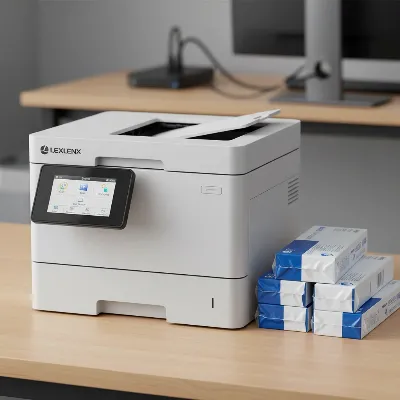 Lexmark MB3442adw multifunction laser printer on a desk in a modern office setting, showcasing its compact design and 2.8-inch touchscreen.
Unpacking the Features: Speed, Quality, and Connectivity
The MB3442adw is packed with features designed to maximize efficiency and deliver consistent results, making it a valuable asset for any office.
Blazing Fast Performance
Speed is a critical factor in office productivity, and the Lexmark MB3442adw truly excels in this aspect. It boasts an impressive print speed of up to 42 pages per minute (ppm) for single-sided documents, ensuring that even large print jobs are completed swiftly. For those who prioritize paper conservation, the printer also delivers a respectable 28 ppm in automatic duplex (double-sided) printing mode. The first page out time is remarkably fast, clocking in at as little as 5.9 seconds, which minimizes waiting times for urgent documents. Beyond printing, its scanning capabilities are equally impressive, featuring double-sided automatic scanning at up to 96 images per minute (ipm) in monochrome, significantly accelerating document digitization. Copying speeds mirror printing, with up to 42 copies per minute (cpm) in simplex and 18 cpm in duplex mode, keeping your workflows smooth and uninterrupted.
Exceptional Monochrome Output
When it comes to monochrome documents, clarity and sharpness are paramount. The Lexmark MB3442adw consistently produces excellent print quality, characterized by bold, sharp, and highly detailed text. While the native print resolution is 600 x 600 dots per inch (dpi), Lexmark’s proprietary 2400 IQ technology leverages overlapping dots to achieve an effective resolution of 2400 x 600 dpi. This technical enhancement ensures that text, graphs, and even monochrome photos appear strikingly clear and professional. Unlike some laser printers that might yield pale or grey printouts, the MB3442adw’s prints are notably rich and consistently black, leaving a strong impression.
Seamless Connectivity & Mobile Readiness
|
Our Picks for the Best Laser Printer in 2026
As an Amazon Associate I earn from qualifying purchases.
|
||
| Num | Product | Action |
|---|---|---|
| 1 | Brother HL-L2460DW Wireless Compact Monochrome Laser Printer with Duplex, Mobile Printing, Black & White Output | Includes Refresh Subscription Trial(1), Works with Alexa |

|
| 2 | Brother DCP-L2640DW Wireless Compact Monochrome Multi-Function Laser Printer with Copy and Scan, Duplex, Mobile, Black & White | Includes Refresh Subscription Trial(1), Works with Alexa |
|
| 3 | Brother MFC-L2820DW Wireless Compact Monochrome All-in-One Laser Printer with Copy, Scan and Fax, Duplex, Black & White | Includes Refresh Subscription Trial(1), Works with Alexa |
|
| 4 | HP Laserjet MFP M234dw Wireless Printer, Print, scan, Copy, Fast speeds, Easy Setup, Mobile Printing, Best-for-Small Teams, Instant Ink Eligible |
|
| 5 | Brother HLL6210DW Business Monochrome Laser Printer with Large Paper Capacity, Wireless and Gigabit Ethernet Networking, Advanced Security Features and Mobile Printing (Renewed Premium) |
|
| 6 | Brother HL-L2405W Wireless Compact Monochrome Laser Printer with Mobile Printing, Black & White Output | Includes Refresh Subscription Trial(1), Works with Alexa |
|
| 7 | HP LaserJet MFP M235sdw All-in-One Laser Wireless Printer, Scan/Copy, Black & White, Duplex, Best-for-Office |
|
| 8 | Brother HLL3280CDW Wireless Compact Color Laser Printer, Duplex, Mobile Printing & Ethernet | Includes 2 Month Refresh Subscription Trial¹, Amazon Dash Replenishment Ready (Renewed Premium) |
|
| 9 | Brother DCP-L2640DW Wireless Compact Monochrome Multi-Function Laser Printer with Copy and Scan, Duplex, Black & White Output | Includes Refresh Subscription Trial(1), (Renewed Premium) |
|
| 10 | Canon imageCLASS MF284dw Wireless Black & White Laser Printer – All-in-One for Home Use, Print/Copy/Scan, 2-Sided Printing, 35 PPM, Auto Doc Feeder, Mobile Device Compatible, Starter Toner Included |
|
In today’s connected world, flexible connectivity options are essential. The MB3442adw offers a comprehensive suite of connections, including standard USB, Ethernet for wired network integration, and built-in Wi-Fi for wireless convenience. Mobile printing is fully supported through popular platforms like Apple AirPrint, Google Cloud Print, and Mopria, allowing users to print directly from their smartphones and tablets with ease. The printer integrates built-in cloud connectors, enabling users to effortlessly save scanned documents to, and retrieve files from, popular cloud services such as Dropbox, Google Drive, and Microsoft OneDrive, enhancing document accessibility and workflow flexibility.
Smart Paper Handling
Efficient paper handling is key to managing high-volume tasks. The Lexmark MB3442adw comes equipped with a generous standard input capacity of 350 sheets, divided between a 250-sheet main tray and a 100-sheet multipurpose feeder. For offices with even greater demands, this capacity can be expanded significantly to 900 sheets with the addition of an optional 550-sheet tray, reducing the frequency of paper refills during large print runs. The integrated 50-sheet automatic document feeder (ADF) supports single-pass duplex scanning, a significant time-saver for digitizing multi-page, double-sided documents. Automatic two-sided printing is a standard feature, promoting paper conservation and reducing operational costs.
Intuitive Operation & Robust Security
User-friendliness is central to the MB3442adw’s design. It features a bright and responsive 2.8-inch color touchscreen display, providing an intuitive interface for navigating menus, controlling functions, and accessing settings. While the display is fixed, its clarity and responsiveness ensure a smooth user experience. Beyond ease of use, Lexmark places a strong emphasis on security. The MB3442adw incorporates a full-spectrum security architecture, which includes various embedded features designed to protect your information at every stage—in the document, on the device, and across the network. Features like Standard Confidential Print, which requires a PIN to release jobs, help ensure that sensitive documents remain secure and are only accessed by authorized personnel.
> “The Lexmark MB3442adw provides enterprise-level features, including extra-high-yield toner capacity, a 2.8″ color touchscreen, and strong security features, in a smaller, lower-cost device.” – Melisa Pardo-Bunte, Editor, Better Buys
Weighing the Pros and Cons: Is the MB3442adw Right for You?
Every device has its strengths and weaknesses, and the Lexmark MB3442adw is no exception. Understanding these can help you determine if it aligns with your specific operational needs.
Advantages
- High Print Speed and Efficiency: With up to 42 ppm, it’s one of the faster monochrome laser printers in its class, perfect for high-volume environments.
- Excellent Text Quality: Delivers consistently sharp, bold, and professional-looking text, graphs, and monochrome images.
- Comprehensive Multifunctionality: Combines printing, scanning, copying, and faxing, offering a complete document solution in one device.
- Compact Design: Its surprisingly small footprint makes it suitable for offices with limited desk space, without compromising on features.
- Robust Security Features: Lexmark’s full-spectrum security architecture protects sensitive data throughout the document lifecycle.
- High Duty Cycle: A maximum monthly duty cycle of 80,000 pages, with a recommended volume of up to 8,000 pages, indicates impressive durability and reliability for demanding use.
- Eco-Friendly Certifications: EPEAT Silver and ENERGY STAR certifications highlight its energy efficiency and commitment to sustainability.
Disadvantages
- Monochrome Only: This printer is strictly black and white, making it unsuitable for users who require color printing.
- Running Costs: While competitive for its segment, the cost per page (approximately 2.3 cents with high-yield toner) is considered “somewhat expensive” compared to some high-volume inkjet alternatives.
- Potential Noise: Some reviews indicate it can be louder than dedicated home-office printers, which might be a consideration in very quiet environments.
- Output Bin Capacity: The 150-sheet output bin is considered “slightly disappointing” for a printer with such high input capacity and speed, potentially requiring more frequent emptying during large print jobs.
- Fixed Display: The 2.8-inch touchscreen is not tiltable, which could affect viewing comfort for some users.
The Lexmark MB3442adw in the Market: Competition and Value
When evaluating the Lexmark MB3442adw, it’s crucial to consider its position within the competitive landscape of monochrome multifunction laser printers. Priced around $429 at its review in 2020, it wasn’t the cheapest option but justified its cost with a rapid print rate and a feature-rich touchscreen interface.
The MB3442adw competes effectively with models like the Canon imageClass MF424dw, offering comparable purchase prices and cost per page. However, the Lexmark often pulls ahead with superior input-tray expansion and significantly higher volume ratings, making it a stronger contender for heavier workloads. While some inkjet alternatives, such as the Epson WF-M5799 or ET-M3170, boast lower running costs (e.g., around 0.8 cents per page for the WF-M5799, 0.3 cents for the ET-M3170), they typically fall short in terms of speed and monthly print volume, making the Lexmark a better value for high-demand monochrome printing. For users prioritizing extremely low running costs for very high volumes, a printer like the Brother MFC-L6700DW might offer a lower cost per page (around 1.4 cents) but may have a different feature set or initial price point.
 Lexmark MB3442adw multifunction laser printer in a modern open-plan office, with people collaborating nearby, emphasizing its suitability for workgroups.
The Lexmark MB3442adw distinguishes itself by providing enterprise-level features—such as extra-high-yield toner capacity, an intuitive color touchscreen, and robust security—in a more compact and affordable package. This makes it an excellent value proposition for small and medium-sized businesses and workgroups that require reliable, fast, and secure monochrome printing without the enterprise price tag or footprint. Its robust build quality, featuring a steel frame and long-life imaging components, further ensures durability and minimal maintenance, solidifying its value over time.
Conclusion
The Lexmark MB3442adw multifunction laser printer stands as a formidable choice for any small to medium-sized business or demanding home office seeking a high-performance monochrome solution. Its impressive speed, exceptional print quality, versatile connectivity, and robust security features make it a powerful tool for streamlining document workflows. While it is limited to monochrome printing and its toner costs, though competitive for its class, might not be the absolute lowest, the MB3442adw’s overall efficiency, durability, and compact design offer significant value. If your operations demand fast, reliable, and secure black-and-white printing, scanning, copying, and faxing, this Lexmark model is certainly worthy of strong consideration. Could the MB3442adw be the missing piece to improve your office’s productivity?
Frequently Asked Questions
What is the print speed of the Lexmark MB3442adw?
The Lexmark MB3442adw boasts a fast print speed of up to 42 pages per minute (ppm) for single-sided documents and 28 ppm for automatic two-sided (duplex) printing. It also delivers its first page in as fast as 5.9 seconds.
Does the Lexmark MB3442adw support duplex scanning and printing?
Yes, the Lexmark MB3442adw fully supports both automatic two-sided (duplex) printing and single-pass duplex scanning. This feature allows for efficient processing of double-sided documents, saving time and paper.
What are the connectivity options for the Lexmark MB3442adw?
The MB3442adw offers versatile connectivity, including standard USB for direct connection, Ethernet for wired network integration, and built-in Wi-Fi for wireless convenience. It also supports mobile printing technologies like Apple AirPrint, Google Cloud Print, and Mopria.
Is the Lexmark MB3442adw suitable for a small business?
Absolutely. Designed for demanding workgroups and fast-paced offices, the MB3442adw is ideal for small to medium-sized businesses. It combines essential multifunction capabilities with high print volumes, robust security, and a compact design, making it a strong asset for business operations.
What is the estimated cost per page for the Lexmark MB3442adw?
Using Lexmark’s highest-yield (6,000-page) toner cartridges, the estimated cost per page for the MB3442adw is approximately 2.3 cents. While not the lowest on the market, this is competitive for its class of monochrome laser multifunction printers.
Frequently Asked Questions
What is the maximum print speed of the Lexmark MB3442adw?
The Lexmark MB3442adw offers an impressive print speed of up to 42 pages per minute (ppm) for single-sided documents. For automatic two-sided (duplex) printing, it achieves 28 ppm, with the first page out in as little as 5.9 seconds.
Does the Lexmark MB3442adw support automatic duplex scanning and printing?
Yes, the Lexmark MB3442adw fully supports both automatic two-sided (duplex) printing and single-pass duplex scanning. This functionality significantly enhances efficiency for processing multi-page, double-sided documents, saving both time and paper.
What connectivity options are available with the Lexmark MB3442adw?
The MB3442adw provides comprehensive connectivity options, including standard USB, Ethernet for wired network integration, and built-in Wi-Fi for wireless convenience. It also supports mobile printing via Apple AirPrint, Google Cloud Print, and Mopria, alongside cloud connectors for services like Dropbox and Google Drive.
Is the Lexmark MB3442adw a good choice for a small to medium-sized business?
Yes, the Lexmark MB3442adw is an excellent choice for small to medium-sized businesses and demanding home offices. It combines high print volumes, robust security features, a compact design, and essential multifunction capabilities (print, scan, copy, fax) to streamline office operations.
What is the approximate cost per page for the Lexmark MB3442adw?
When using Lexmark's highest-yield toner cartridges (rated for 6,000 pages), the estimated cost per page for the MB3442adw is approximately 2.3 cents. While this is competitive for its class of monochrome laser multifunction printers, it's important to compare it with specific alternatives for your budget.
Get our weekly buyer guide
Practical specs, not advice. Unsubscribe anytime.

I’ve been using the Lexmark MB3442adw for my home office for about a month now, and it’s been fantastic. The 42 ppm print speed is no joke; large documents fly through. I really appreciate having the scan, copy, and fax all in one compact unit, it saves so much space on my desk. Definitely a solid investment for anyone needing high-volume monochrome printing.
The MB3442adw does a good job with printing and copying, and the monochrome output is consistent. However, I found the fax setup a bit more complicated than I expected, which was a bit frustrating. It’s a robust machine overall, but that one feature could be more user-friendly for someone not super tech-savvy.
This Lexmark printer is a beast for our small business. The text quality is super sharp, which is crucial for our client reports. Connectivity was a breeze to set up with our existing network. My only minor gripe is that the initial toner cartridge didn’t last as long as I’d hoped, but replacements seem reasonably priced.
We upgraded to the Lexmark MB3442adw from an older model, and the difference is night and day. The security features are a huge plus for our sensitive documents, giving us peace of mind. It handles our daily print load without any hiccups, making it a true workhorse for our busy office environment. Highly recommend for its reliability.